🧠 Learn MCP Works — Understanding MCP via MCP Playground
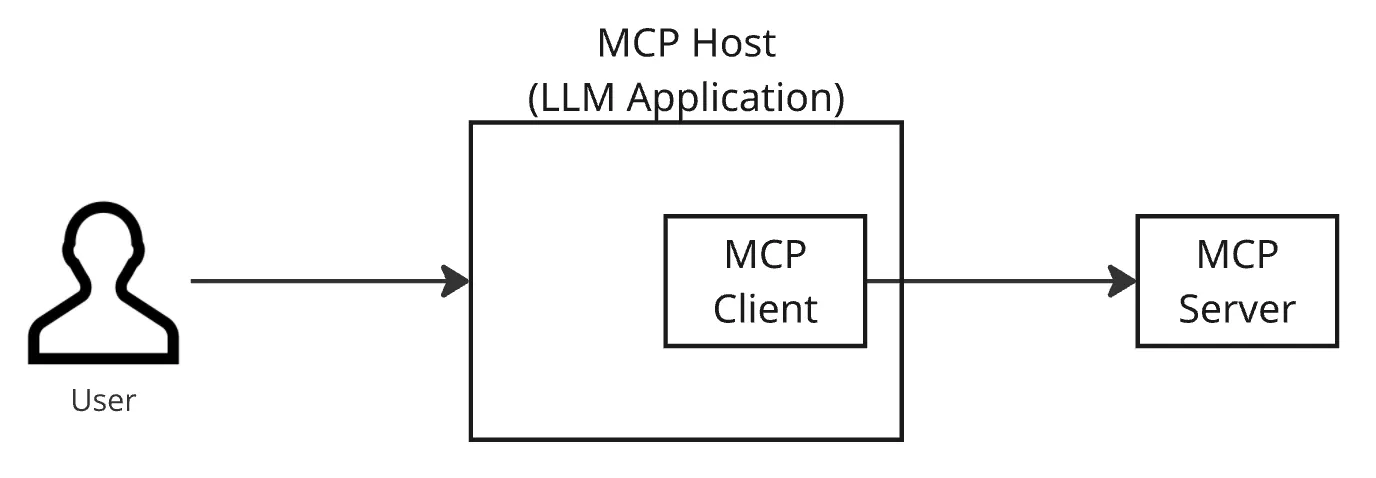
Model Context Protocol (MCP) is a communication standard that allows Large Language Models (LLMs) to interact with the real world — such as file systems, tools, APIs, and external resources — in a structured, secure, and auditable manner.
The mcp-playground repo was created for one main purpose:
👉 to make the usually abstract MCP feel real and hands-on.
This isn't just theory documentation on MCP; it's an end-to-end simulation of how MCP works in the real world.
🎯 What is MCP Playground?
MCP Playground is a sandbox project demonstrating:
-
how user input → is understood by the LLM
-
how intent → is mapped to MCP tools
-
how the MCP server → executes the tool
-
how results → are returned to the UI
All of this happens without giving the LLM direct access to the system.
The LLM is not free. It can only call tools that are explicitly registered.
And therein lies the power of MCP.
🧩 MCP Playground Architecture Overview
In simple terms, the system flow looks like this:
User (Browser UI)
↓
MCP Client (Intent Resolver)
↓
MCP Server (Tool Registry)
↓
Workspace (Sandbox File System)
Each layer has a clear responsibility and does not overstep its boundaries.
🖥️ 1. Browser UI (Frontend)
This part is the human interaction interface.
Its functions:
-
receiving natural language input
-
displaying tool execution results
-
showing process traces (tool calls)
The UI doesn't know the detailed inner workings of the tools.
The UI only knows: send command → receive result.
🧠 2. MCP Client — Intent Translator
This is where the initial "intelligence" happens.
The MCP Client's tasks:
-
receiving user text input
-
determining which MCP tool is relevant
-
constructing the payload according to the tool schema
Example:
User: "Show all TypeScript files"
Client will translate it into:
tool: list_files
args:
  pattern: "*.ts"
⚠️ Important:
The Client doesn't execute anything — it only translates intent.
🧰 3. MCP Server — Tool Registry & Executor
This is the heart of MCP.
The Server is responsible for:
-
registering MCP tools
-
validating inputs
-
executing tools
-
returning results in a structured format
The LLM cannot access the system at will.
It can only call tools that have been registered on the server.
Example tools available in the playground:
-
read_file -
list_files -
search_files -
directory_tree -
file_metadata -
workspace_stats
Every tool:
-
has an input schema
-
has limitations
-
has security controls
📂 4. Workspace — A Secure Sandbox
The Workspace is a controlled, mock file system.
Its key features:
-
only specific folders can be accessed
-
no escaping the sandbox
-
file size limits
-
path validation
This prevents:
-
directory traversal
-
access to sensitive files
-
destructive commands
In other words:
The LLM may read, but it cannot roam wild.
🔄 Real-World Flow Example
Prompt:
"Search for the word
serverin all TypeScript files."
The flow:
- UI sends text to MCP Client
- Client selects the
search_filestool - Payload is sent to the MCP Server
- Server validates input
- Tool is executed in the workspace
- Results are returned to the UI
The LLM never:
-
reads files directly
-
executes shell commands
-
accesses the OS
Everything goes through MCP.
🛡️ Why is MCP Important?
Without MCP:
-
LLM = too free
-
hard to audit
-
prone to data leaks
-
difficult to scale
With MCP:
-
explicit tool usage
-
controlled security
-
traceable logs
-
cleaner agent architecture
MCP is the foundation for serious AI Agents, not just chatbots.
🚀 Why is MCP Playground Worth Learning?
Because this repo:
-
is not just theory
-
is not just snippets of code
-
shows the MCP flow from UI to tool execution
-
is suitable for engineers who want to build real AI agents
If you want to:
-
build internal AI agents
-
connect LLMs to company data
-
build secure AI tooling
👉 this repo is the right starting point.
🧾 Conclusion
MCP Playground proves that:
A powerful LLM is not one that is most free,
but one that is most well-controlled.
Through MCP, AI no longer just answers —
it acts according to clear rules.
And this repo is a real example of how MCP should be used.