Ollama + Google Maps
Application thats show place using AI recommend + Google Maps
pythonflaskreactaigoogle-cloudgoogle-maps
Share this project:
Project Overview
🌐 Ollama + Google Maps AI Finder
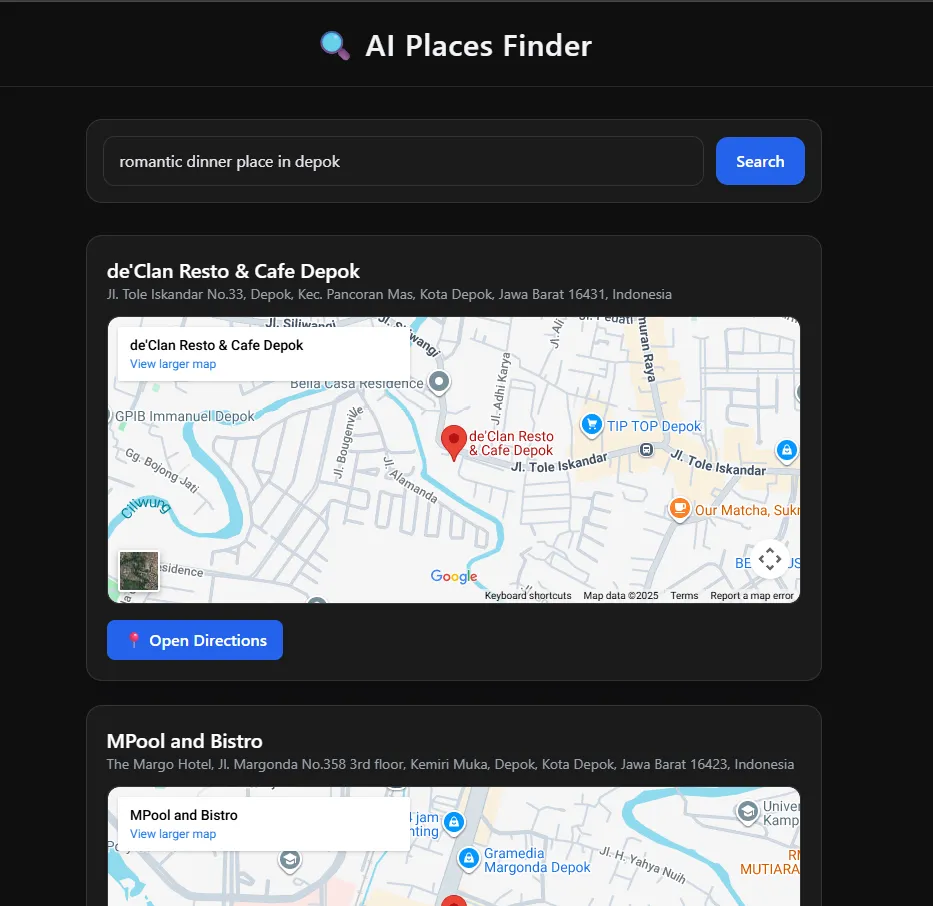
A modern full-stack application that combines local LLM (Ollama) and Google Maps Places API to help users find places (restaurants, cafés, etc.) using natural language.
The interface uses a dark, modern Chat-AI style, built with React + Vite + Tailwind CSS, and the backend is powered by Flask (Python) with rate-limiting, caching, and secure API communication.
🚀 Features
- 🔍 AI-enhanced searching (Ollama refines user query)
- 📍 Google Maps Text Search integration
- 🗺️ Live embedded map preview
- 🚗 Open Google Maps directions
- 🌙 Dark AI-chat themed UI
- ⚡ Fast thanks to Vite + Tailwind CSS
- 🔐 Secure backend with:
- Flask rate limiter
- Environment variable secrets
- CORS protection
- API key masking
- Request caching
🏗️ Tech Stack
Frontend
- React (JavaScript)
- Vite
- Tailwind CSS
- Modern Dark UI
Backend
- Python Flask
- httpx
- Flask-Limiter
- Flask-Caching
- Dotenv
AI
- Local LLM using Ollama
(Recommended models:llama3,llama3.1,mistral, etc.)
Maps
- Google Maps Places API
- Google Maps Embed API
📁 Project Structure
maps-ollama-projects/
│
├── backend/
│ ├── app.py
│ ├── requirements.txt
│ ├── .env
│ └── .venv/
│
└── frontend/
├── index.html
├── postcss.config.js
├── tailwind.config.js
├── src/
│ ├── App.js
│ ├── main.js
│ ├── SearchForm.js
│ └── MapEmbed.js
└── package.json
🔧 1. Backend Setup (Flask)
📌 Install dependencies
cd backend
python -m venv .venv
.\.venv\Scripts\activate    # Windows
pip install -r requirements.txt
📌 Create .env file
GOOGLE_MAPS_API_KEY=YOUR_GOOGLE_CLOUD_API_KEY
PORT=5000
OLLAMA_URL=http://localhost:11434/api/generate
✔ Make sure Places API is enabled ✔ Restrict key using IP (127.0.0.1 or your local network IP)
📌 Run backend
python app.py
Backend available at:
http://localhost:5000
🎨 2. Frontend Setup (React + Vite + Tailwind)
cd frontend
npm install
npm run dev
Frontend available at:
http://localhost:5173
▶️ 3. Running the Application
Start Ollama:
ollama serve
Start backend:
cd backend
.\.venv\Scripts\activate
python app.py
Start frontend:
cd frontend
npm run dev
Open browser:
http://localhost:5173
🧪 Example Query
Try searching:
"24h café in Depok"
"best sushi near Surabaya"
"romantic dinner place in Jakarta"
"cheap coffee shop near UI"
Ollama will refine the query → backend sends to Google → results display with map.