Bank Saving System
Modern deposito account management system with interest calculation
Share this project:
Project Overview
🏦 Bank Saving System
Modern deposito account management system built with React, Node.js, Express, and PostgreSQL. Features automatic interest calculation, clean architecture, and beautiful UI with shadcn/ui.
✨ Features
🎯 Core Functionality
- Customer Management - Create, update, and manage customer profiles
- Deposito Types - Configure different deposito packages with varying interest rates
- Account Management - Open and manage deposito accounts with customer linking
- Smart Transactions - Automated deposit processing and withdrawal with interest calculation
- Interest Calculation - Automatic calculation based on duration and monthly return rates
💎 Technical Highlights
- Clean Architecture - Separated layers (routes → controllers → services)
- Modern UI - Built with React, Tailwind CSS, and shadcn/ui components
- Type-Safe API - RESTful API with validation middleware
- Transaction Safety - PostgreSQL transactions with row-level locking
- Responsive Design - Works seamlessly on desktop and mobile devices
📸 Screenshots
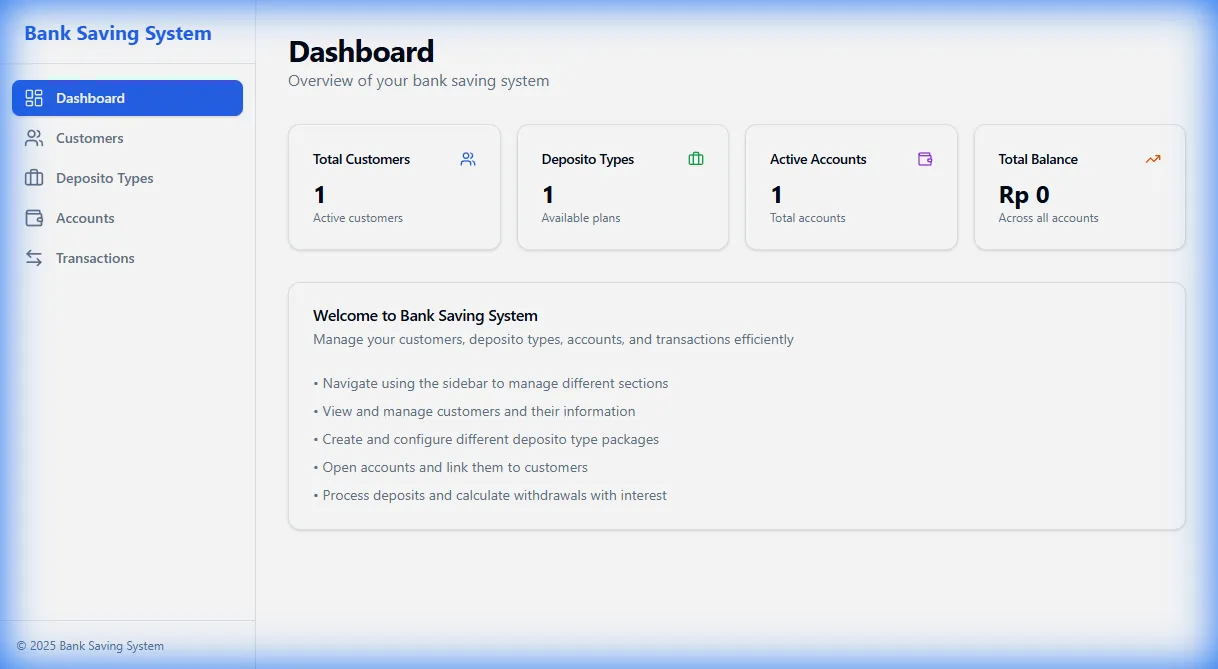
Dashboard
 Statistics overview with total customers, accounts, and balance
Customer Management
 CRUD operations for customer management with dialog forms
Deposito Types
 Configure deposito packages with different interest rates
Account Management
 View and manage customer accounts with balance tracking
Transactions
 Process deposits and withdrawals with automatic interest calculation
🏗️ Architecture
┌─────────────────────────────────────────────────────────┐
│                     Frontend (React)                     │
│  React Router │ shadcn/ui │ Tailwind CSS │ Lucide Icons │
└────────────────────┬────────────────────────────────────┘
                     │ HTTP/JSON REST API
┌────────────────────┴────────────────────────────────────┐
│                  Backend (Node.js/Express)               │
│  Routes → Controllers → Services → Database              │
└────────────────────┬────────────────────────────────────┘
                     │ SQL Queries
┌────────────────────┴────────────────────────────────────┐
│                  Database (PostgreSQL)                   │
│  customers │ deposito_types │ accounts │ transactions    │
└─────────────────────────────────────────────────────────┘
Backend Structure
backend/src/
├── config/          # Database configuration
├── utils/           # Helper functions (date, interest calc)
├── middleware/      # Validation & error handling
├── services/        # Business logic layer
├── controllers/     # HTTP request handlers
├── routes/          # API endpoint definitions
└── index.js         # Server entry point
Frontend Structure
frontend/src/
├── components/
│   ├── ui/          # shadcn/ui base components
│   └── layout/      # Layout components (Sidebar, AppLayout)
├── pages/           # Page components (Dashboard, Customers, etc.)
├── lib/             # Utilities
├── api.js           # API client
└── App.jsx          # Router setup
🚀 Quick Start
Prerequisites
- Node.js 18+
- PostgreSQL 14+
- npm or yarn
Installation
- Clone the repository
git clone https://github.com/daffa09/bank-saving-system.git
cd bank-saving-system
- Setup Database
# Create PostgreSQL database
createdb bank_saving_system

# Run the schema (see docs/DATABASE_DESIGN.md for SQL)
psql bank_saving_system < schema.sql
- Setup Backend
cd backend
npm install

# Create .env file
echo "DATABASE_URL=postgresql://user:password@localhost:5432/bank_saving_system" > .env
echo "PORT=5000" >> .env

# Start backend server
npm run dev
- Setup Frontend
cd frontend
npm install

# Install required dependencies
npm install react-router-dom lucide-react class-variance-authority clsx tailwind-merge sonner date-fns
npm install @radix-ui/react-dialog
npm install -D tailwindcss@3 postcss autoprefixer

# Start frontend dev server
npm run dev
- Access the application
- Frontend: http://localhost:5173
- Backend API: http://localhost:5000
🐳 Docker Deployment
Quick Start with Docker
Backend:
cd backend
docker build -t bank-system-backend .
docker run -p 5000:5000 -e DATABASE_URL=postgresql://user:pass@host:5432/db bank-system-backend
Frontend:
cd frontend
docker build -t bank-system-frontend .
docker run -p 3000:3000 bank-system-frontend
For detailed Docker setup, environment variables, and Docker Compose configuration, see DOCKER.md.
📚 Documentation
Comprehensive documentation is available in the docs/ folder:
- Database Design - ERD, schemas, relationships
- API Documentation - All endpoints with examples
- UML Diagrams - Class, sequence, use case diagrams
- User Journey - User flows and wireframes
- Postman Collection - Ready-to-import API tests
- API Blueprint (Apiary) - Online API documentation format
Online API Documentation
View the API documentation online: Apiary Documentation
🔌 API Endpoints
Base URL: http://localhost:5000
| Method | Endpoint | Description |
|---|---|---|
| GET | /health |
Health check |
| GET | /customers |
Get all customers |
| POST | /customers |
Create customer |
| PUT | /customers/:id |
Update customer |
| DELETE | /customers/:id |
Delete customer |
| GET | /deposito-types |
Get all deposito types |
| POST | /deposito-types |
Create deposito type |
| PUT | /deposito-types/:id |
Update deposito type |
| DELETE | /deposito-types/:id |
Delete deposito type |
| GET | /accounts |
Get all accounts |
| POST | /accounts |
Create account |
| PUT | /accounts/:id |
Update account |
| DELETE | /accounts/:id |
Delete account |
| POST | /accounts/:id/deposit |
Deposit money |
| POST | /accounts/:id/withdraw |
Withdraw with interest |
💰 Interest Calculation
The system calculates interest using the following formula:
months = diffMonths(opened_at, withdrawal_date)
monthly_return = yearly_return / 12 / 100
interest = balance × months × monthly_return
ending_balance = balance + interest
Example:
- Initial Balance: Rp 10,000,000
- Yearly Return: 6%
- Duration: 12 months
- Interest Earned: Rp 600,000
- Total Payout: Rp 10,600,000
🛠️ Tech Stack
Frontend
- React 19 - UI library
- React Router - Navigation
- Tailwind CSS - Utility-first CSS
- shadcn/ui - Component library
- Lucide React - Icons
- Sonner - Toast notifications
- Vite - Build tool
Backend
- Node.js - Runtime
- Express.js - Web framework
- PostgreSQL - Database
- pg - PostgreSQL client
- dotenv - Environment variables
- cors - CORS middleware
Development Tools
- ESLint - Code linting
- Postman - API testing
- Git - Version control
📊 Database Schema
customers
├── id (PK)
└── name

deposito_types
├── id (PK)
├── name
└── yearly_return

accounts
├── id (PK)
├── packet
├── customer_id (FK → customers)
├── deposito_type_id (FK → deposito_types)
├── balance
└── opened_at

transactions
├── id (PK)
├── account_id (FK → accounts)
├── type (DEPOSIT/WITHDRAW)
├── amount
└── created_at
🎨 UI Components
The application uses shadcn/ui components for a consistent, modern interface:
- Button - Primary actions with variants
- Card - Content containers
- Dialog - Modal forms
- Input - Form inputs with validation
- Table - Data display
- Badge - Status indicators
- Toast - Notifications
- Select - Dropdowns
🔒 Security Features
- SQL injection prevention via parameterized queries
- Row-level locking for transaction safety
- Input validation middleware
- Error handling with sanitized responses
- CORS configuration
🚦 Testing
Manual Testing
- Import Postman collection from
docs/Bank_Saving_System_API.postman_collection.json - Set environment variable
base_urltohttp://localhost:5000 - Run requests in order:
- Create customers
- Create deposito types
- Create accounts
- Process transactions
Test Scenarios
- Create customer → Open account → Deposit → Withdraw
- Multiple deposits to same account
- Withdrawal interest calculation verification
- Delete cascade (customer with accounts)
📈 Future Enhancements
- User authentication & authorization
- Transaction history view
- Export reports (PDF/Excel)
- Email notifications
- Interest rate history tracking
- Mobile app (React Native)
- Automated tests (Jest, Cypress)
- Docker containerization
- CI/CD pipeline
🤝 Contributing
Contributions are welcome! Please follow these steps:
- Fork the repository
- Create a feature branch (
git checkout -b feature/AmazingFeature) - Commit your changes (
git commit -m 'Add some AmazingFeature') - Push to the branch (
git push origin feature/AmazingFeature) - Open a Pull Request
📝 License
This project is licensed under the MIT License - see the LICENSE file for details.
👨💻 Author
Daffa Fathan
- GitHub: @daffa09
- LinkedIn: Daffa Fathan
🌟 Acknowledgments
- shadcn/ui - Amazing component library
- Tailwind CSS - Utility-first CSS framework
- Lucide Icons - Beautiful icon set
- Radix UI - Unstyled accessible components