Blue Nirvana - Movibes Streaming Platform
Movie and series streaming platform web interface built with HTML, CSS, and JavaScript featuring dark mode design
Share this project:
Project Overview
Blue Nirvana - Movibes Streaming Platform
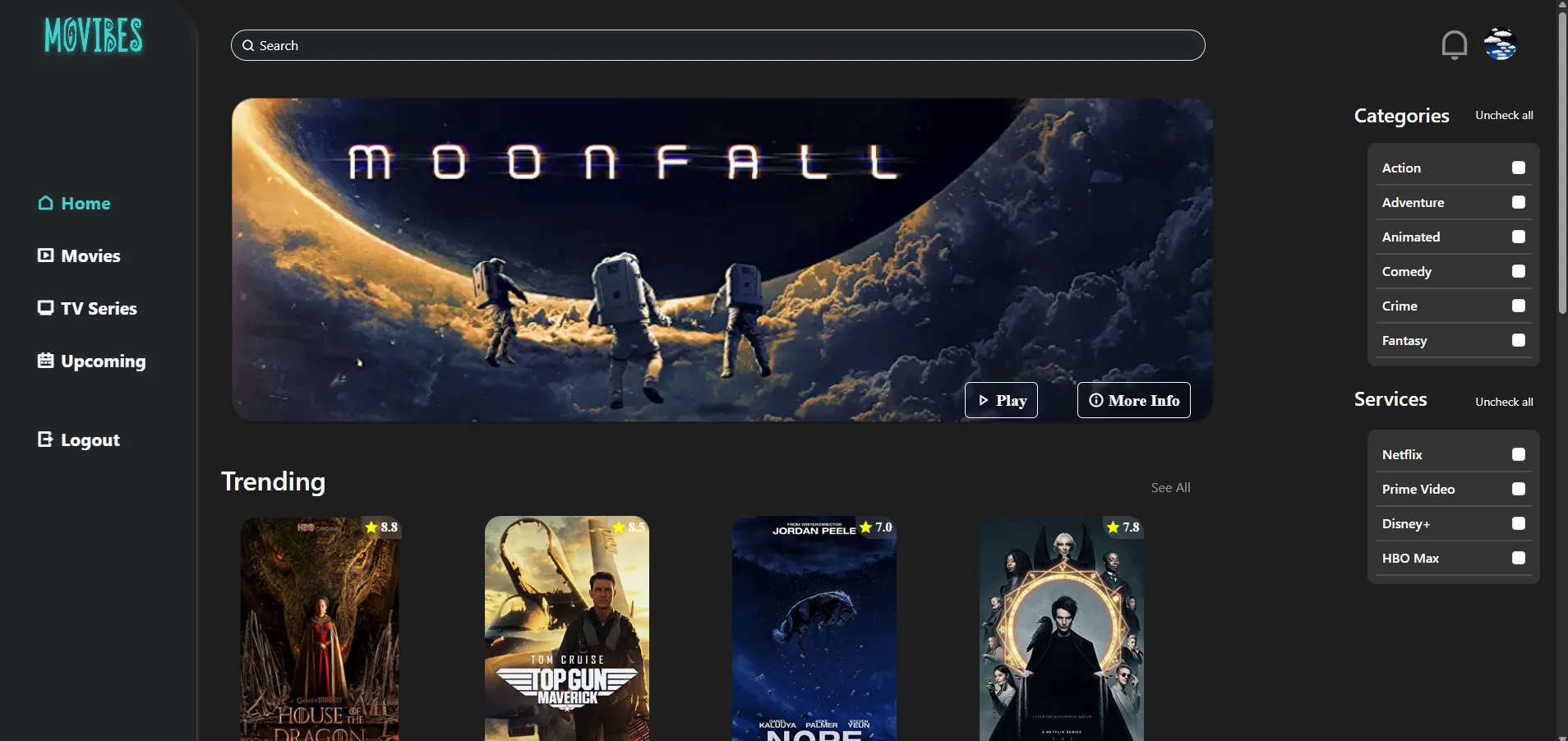
A sleek movie and series streaming platform interface built with vanilla HTML, CSS, and JavaScript. Created by students from Pancasila University as a Web Design course project, featuring a modern dark mode aesthetic and intuitive user experience.
📋 Overview
Movibes is a movie and series streaming platform interface that showcases modern web design principles. Built without frameworks, it demonstrates proficiency in front fundamental web technologies while delivering a visually appealing and user-friendly streaming experience.
👥 Team Members (Blue Nirvana)
- Daffa Fathan (4522210082) - GitHub
- Fathan Rachel (4522210071) - GitHub
- Antonius Valentino (4522210109) - GitHub
- Firja Rakha (4522210072) - GitHub
- Tegar Gemilang (4522210095) - GitHub
✨ Features
User Interface
- Modern Design: Clean, minimalist interface with dark mode theme
- Responsive Layout: Adapts seamlessly to all screen sizes
- Smooth Animations: Engaging transitions and hover effects
- Intuitive Navigation: Easy-to-use menu and category browsing
Content Display
- Movie Grid: Organized display of available movies
- Series Collection: Dedicated section for TV series
- Hero Banner: Featured content showcase
- Category Filters: Browse by genre, popularity, or release date
Interactive Elements
- Movie Cards: Detailed information on hover
- Play Buttons: Quick access to content
- Search Functionality: Find movies and series easily
- User Menu: Profile and settings access
Design Highlights
- Dark Mode Theme: Eye-friendly viewing experience
- Custom Color Palette: Cohesive visual identity
- Typography: Modern, readable fonts
- Icons: Clean, consistent iconography
🛠️ Technologies Used
- HTML5: Semantic markup and structure
- CSS3: Advanced styling and animations
- Flexbox & Grid layouts
- CSS Variables (custom properties)
- Transitions and transforms
- Media queries for responsiveness
- JavaScript (Vanilla): Interactive functionality
- DOM manipulation
- Event handling
- Dynamic content loading
- Search and filter logic
📁 Project Structure
blue-nirvana-team/
├── index.html              # Main homepage
├── src/
│   ├── css/
│   │   ├── style.css      # Main stylesheet
│   │   ├── responsive.css # Mobile styles
│   │   └── components.css # Component styles
│   └── js/
│       ├── main.js        # Core functionality
│       ├── search.js      # Search feature
│       └── carousel.js    # Featured content slider
├── img/                   # Movie posters and assets
│   ├── movies/
│   ├── series/
│   └── icons/
├── .vscode/               # VS Code settings
├── .editorconfig         # Code formatting config
├── .gitignore
└── README.md
🚀 Getting Started
Prerequisites
- Modern web browser (Chrome, Firefox, Safari, Edge)
- (Optional) Local development server
- (Optional) VS Code with Live Server extension
Installation & Setup
-
Clone the Repository
git clone <repository-url> cd blue-nirvana-team -
Open in Browser
Option 1: Direct Open
- Simply double-click
index.html - Opens in default browser
Option 2: Local Server (Recommended)
Using Python:
# Python 3
python -m http.server 8000

# Python 2
python -m SimpleHTTPServer 8000
Using Node.js:
npx http-server -p 8000Using VS Code Live Server:
- Right-click on
index.html - Select "Open with Live Server"
- Simply double-click
-
Access the Platform
http://localhost:8000
💻 Usage
Browsing Content
-
Homepage
- View featured movies and series
- Browse latest additions
- See popular content
-
Categories
- Click genre tags
- Filter by type (Movies/Series)
- Sort by popularity or date
-
Search
- Use search bar
- Type movie/series name
- See filtered results instantly
-
Movie Details
- Hover over movie card
- Click for more information
- See rating, synopsis, cast
Navigation
- Home: Return to main page
- Movies: Browse movie collection
- Series: View available TV shows
- My List: Saved favorites
- Profile: User preferences
🎨 Design System
Color Palette
:root {
  /* Primary Colors */
  --primary-bg: #141414;
  --secondary-bg: #1e1e1e;
  --accent-color: #e50914;

  /* Text Colors */
  --text-primary: #ffffff;
  --text-secondary: #b3b3b3;
  --text-muted: #737373;

  /* Interactive */
  --hover-bg: #2f2f2f;
  --button-primary: #e50914;
  --button-hover: #f40612;
}
Typography
/* Headings */
font-family: 'Poppins', 'Helvetica Neue', sans-serif;

/* Body Text */
font-family: 'Inter', 'Arial', sans-serif;

/* Sizes */
h1: 2.5rem / 40px
h2: 2rem / 32px
h3: 1.5rem / 24px
body: 1rem / 16px
Layout Grid
- Desktop: 6-column grid for movie cards
- Tablet: 4-column grid
- Mobile: 2-column grid
🎯 Key Features Implementation
Dark Mode Theme
The entire platform uses a carefully crafted dark color scheme:
- Reduces eye strain during extended viewing
- Modern, premium aesthetic
- Consistent across all pages
- Optimized contrast ratios for readability
Responsive Design
Breakpoints:
/* Mobile First */
@media (min-width: 640px)  { /* Tablet */ }
@media (min-width: 1024px) { /* Desktop */ }
@media (min-width: 1280px) { /* Large Desktop */ }
Movie Card Hover Effect
.movie-card {
  transition: transform 0.3s ease;
}

.movie-card:hover {
  transform: scale(1.05);
  box-shadow: 0 8px 16px rgba(0,0,0,0.3);
}
Search Functionality
function searchMovies(query) {
  const movies = document.querySelectorAll('.movie-card');
  movies.forEach(movie => {
    const title = movie.dataset.title.toLowerCase();
    movie.style.display = title.includes(query.toLowerCase())
      ? 'block'
      : 'none';
  });
}
📱 Pages
Homepage (index.html)
- Hero banner with featured content
- Trending movies section
- Popular series section
- Continue watching (if user logged in)
Movies Page
- Complete movie library
- Genre filters
- Sort options
- Grid view
Series Page
- TV shows collection
- Season information
- Episode counts
- Binge-worthy picks
Profile Page (if implemented)
- User information
- Watch history
- My list
- Preferences
🔧 Customization
Adding New Movies
- Add movie poster to
img/movies/ - Update movie data:
<div class="movie-card" data-title="Movie Name" data-genre="Action">
  <img src="img/movies/poster.jpg" alt="Movie Name">
  <div class="movie-info">
    <h3>Movie Name</h3>
    <p class="rating">★ 8.5</p>
  </div>
</div>
Changing Theme Colors
Edit CSS variables in src/css/style.css:
:root {
  --primary-bg: #your-color;
  --accent-color: #your-accent;
}
🐛 Troubleshooting
Images Not Loading
- Check file paths in HTML
- Verify images are in
img/folder - Check file extensions match code
Styles Not Applying
- Clear browser cache
- Check CSS file paths
- Verify CSS syntax
JavaScript Not Working
- Open browser console (F12)
- Check for errors
- Ensure scripts load in correct order
🚀 Future Enhancements
Potential improvements:
- Backend integration (Node.js, PHP)
- User authentication system
- Video player integration
- Reviews and ratings
- Watchlist functionality
- Recommendation algorithm
- Social features (sharing, comments)
- Multiple language support
- Progressive Web App (PWA)
- API integration (TMDB, OMDB)
🎓 Learning Outcomes
This project taught our team:
Web Design
- Modern UI/UX principles
- Color theory and typography
- Responsive design patterns
- Dark mode implementation
- Visual hierarchy
Frontend Development
- Semantic HTML5
- Advanced CSS techniques
- Vanilla JavaScript
- DOM manipulation
- Event-driven programming
Team Collaboration
- Git workflow
- Code reviews
- Task distribution
- Design consistency
- Project planning
📐 Design Principles
- Simplicity: Clean, uncluttered interface
- Consistency: Uniform design language
- Visual Appeal: Attractive dark theme
- Usability: Intuitive navigation
- Performance: Fast loading times
🎨 Inspiration
Design inspired by:
- Netflix interface
- Disney+ layout
- HBO Max aesthetics
- Modern streaming platforms
🤝 Contributing
This is an academic group project. Team contributions include:
- UI/UX design
- Frontend development
- Content curation
- Testing and debugging
- Documentation
📄 License
Created for educational purposes as a Web Design course project at Pancasila University.
💭 Team Reflection
Movibes represents our collective effort to create a professional-grade streaming platform interface using fundamental web technologies. The simple yet attractive dark mode design showcases our understanding of modern web design principles and our ability to work collaboratively on a cohesive project.
Developed by Blue Nirvana Team 🎬✨
A Modern Streaming Platform Interface for Web Design Course!