MCP Developer Playground
Interactive MCP-powered developer assistant with LLM-driven workspace analysis tools and intelligent reasoning
Share this project:
Project Overview
MCP Developer Workspace
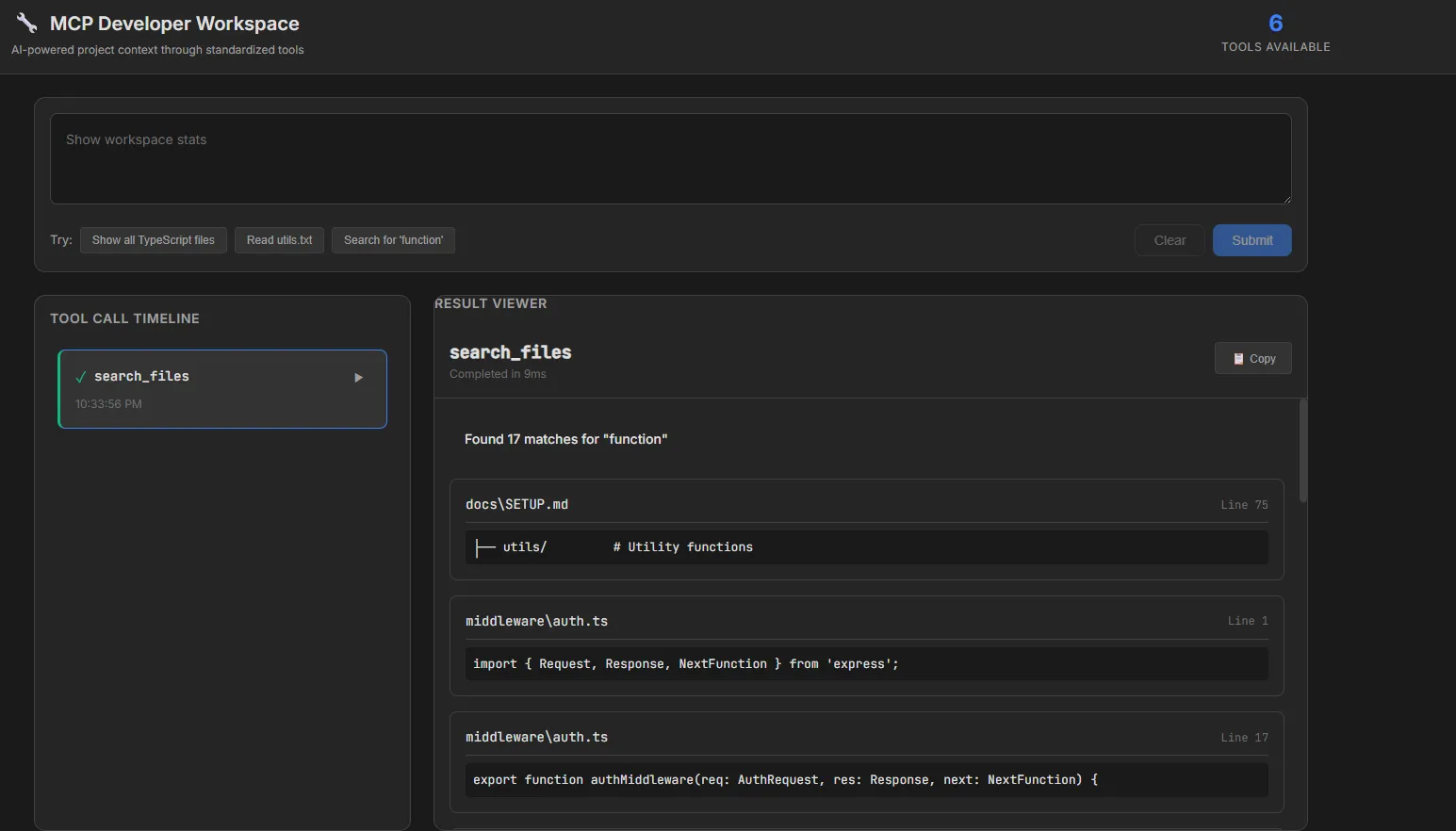
An AI-powered developer assistant that safely exposes project context through standardized MCP (Model Context Protocol) tools.
This system demonstrates how LLMs can interact with real-world codebases through a clean client-server architecture, providing transparency, safety, and extensibility.
🎯 Features
- 6 MCP Tools: Read files, list files, search content, file metadata, directory tree, workspace statistics
- Safety-First Design: Sandboxed workspace, path traversal protection, rate limiting
- Transparent Tool Invocation: Visual timeline showing every tool call with inputs and outputs
- Modern Web UI: React + TypeScript interface with dark mode and professional design
- Simple Reasoning: Intent classification that maps natural language to tool invocations
- Developer-Focused: Designed for understanding project context, not executing arbitrary commands
🏗️ Architecture
┌─────────────┐
│   Web UI    │  ← React + TypeScript + Vite
│  (Port 5173)│
└──────┬──────┘
       │ HTTP
┌──────▼──────┐
│ MCP Client  │  ← Intent Classification + Tool Selection
│  (Browser)  │
└──────┬──────┘
       │ HTTP POST /invoke
┌──────▼──────┐
│ MCP Server  │  ← Express + Tool Registry
│  (Port 3000)│
└──────┬──────┘
       │ Sandboxed Access
┌──────▼──────┐
│  Workspace  │  ← ./workspace/* (read-only)
│   Directory │
└─────────────┘
📋 Available MCP Tools
| Tool | Description | Input | Safety |
|---|---|---|---|
read_file |
Read file content | { path: string } |
1MB size limit, path validation |
list_files |
List files with optional pattern | { directory?, pattern?, recursive? } |
Sandboxed to workspace |
search_files |
Search for text in files | { query, file_pattern?, case_sensitive? } |
100 result limit |
file_metadata |
Get file stats | { path: string } |
Read-only operation |
directory_tree |
Visual directory structure | { depth?: number } |
Max depth 5 levels |
workspace_stats |
Project statistics | {} |
Cached computation |
🚀 Getting Started
Prerequisites
- Node.js 20+
- npm 9+
Installation
-
Install server dependencies:
npm install -
Install UI dependencies:
cd src/ui && npm install && cd ../..
Running the System
- Start the MCP Server (Terminal 1):
Server runs on
npm run serverhttp://localhost:3000
2 Start the Web UI (Terminal 2):
npm run ui
UI runs on http://localhost:5173
- Open your browser: Navigate to
http://localhost:5173
💡 Example Queries
Try these natural language queries in the UI:
- "Show all TypeScript files" → Invokes
list_fileswithpattern: "*.ts" - "Read utils.txt" → Invokes
read_filewithpath: "utils.txt" - "Search for 'function'" → Invokes
search_fileswithquery: "function" - "Show directory tree" → Invokes
directory_tree - "Show workspace stats" → Invokes
workspace_stats - "Get metadata for utils.txt" → Invokes
file_metadata
🛠️ Project Structure
mcp-playground/
├── src/
│   ├── server/           # MCP Server (Express + TypeScript)
│   │   ├── index.ts      # Server entrypoint, routes, middleware
│   │   ├── tools.ts      # Tool registry and handlers
│   │   ├── middleware/   # Rate limiter
│   │   └── utils/        # Validation utilities
│   │
│   ├── client/           # MCP Client (CLI + Reasoning)
│   │   ├── index.ts      # Client entrypoint
│   │   └── reasoning.ts  # Intent classification
│   │
│   ├── ui/               # Web UI (React + TypeScript + Vite)
│   │   ├── src/
│   │   │   ├── components/  # React components
│   │   │   ├── services/    # API client
│   │   │   ├── types/       # TypeScript types
│   │   │   └── styles/      # Global CSS
│   │   ├── index.html
│   │   ├── vite.config.ts
│   │   └── package.json
│   │
│   └── types/            # Shared TypeScript types
│       └── mcp.ts
│
├── workspace/            # Sandboxed workspace directory
│   └── utils.txt
│
├── package.json
├── tsconfig.json
└── README.md
🧪 CLI Mode (Optional)
You can also use the MCP client from the command line:
npm run client -- "Show all TypeScript files"
🔒 Safety Mechanisms
| Mechanism | Implementation | Purpose |
|---|---|---|
| Path Validation | validatePath() in utils/validation.ts |
Prevents directory traversal attacks |
| File Size Limits | 1MB max for read operations | Prevents memory exhaustion |
| Result Limits | Max 100 results for searches | Prevents DoS |
| Rate Limiting | 100 requests/minute per IP | Prevents abuse |
| Operation Timeout | 5 seconds max execution | Handles long-running operations |
| Sandboxed Workspace | All file access restricted to ./workspace/ |
Prevents system file access |
🎨 UI Features
- Dark Mode Design: Professional color palette optimized for developers
- Tool Call Timeline: Visual history of all tool invocations with status icons
- Context-Aware Result Viewer: Different rendering for each tool type:
- Syntax-highlighted code for
read_file - File lists with metadata for
list_files - Search results with line numbers for
search_files - Statistics dashboard for
workspace_stats
- Syntax-highlighted code for
- Example Prompts: Quick-start suggestions
- Responsive Layout: Works on desktop and tablet
🚧 Future Enhancements
Phase 2: File Modification Tools
- Add
write_file,delete_file,rename_file - Implement confirmation dialogs and undo functionality
Phase 3: Real LLM Integration
- Replace keyword-based reasoning with OpenAI/Anthropic/Gemini API
- Implement chain-of-thought reasoning for complex queries
Phase 4: IDE Integrations
- VS Code extension
- JetBrains plugin
- LSP integration for deeper code understanding
Phase 5: Multi-Project Support
- Switch between multiple workspaces
- Project-level configuration
- Workspace templates
Phase 6: Hosted Service
- Cloud deployment
- Authentication and authorization
- Team collaboration features
🧑💻 Development
Running Tests (Future)
npm test                  # Unit tests
npm run test:integration  # Integration tests
npm run test:e2e          # End-to-end tests
Building for Production
cd src/ui && npm run build
📝 License
MIT
🙏 Acknowledgments
Built with inspiration from:
- Anthropic's Model Context Protocol
- Cursor
- Claude Code
- Google Antigravity
🤔 Why MCP?
MCP provides a standardized interface for LLMs to interact with external systems safely:
- ✅ Explicit tools instead of free-form commands
- ✅ Structured inputs with validation
- ✅ Clear client-server separation
- ✅ Transparency in tool invocation
- ✅ Safety-first design with sandboxing
This project is a portfolio-worthy demonstration of understanding AI infrastructure, safety mechanisms, and full-stack development.
Made with 🔧 by following the MCP specification and best practices in AI safety.