Spinach Detector
Real-time object detection system for identifying spinach (bayam) using YOLO models
Share this project:
Project Overview
🥬 Spinach Detector AI
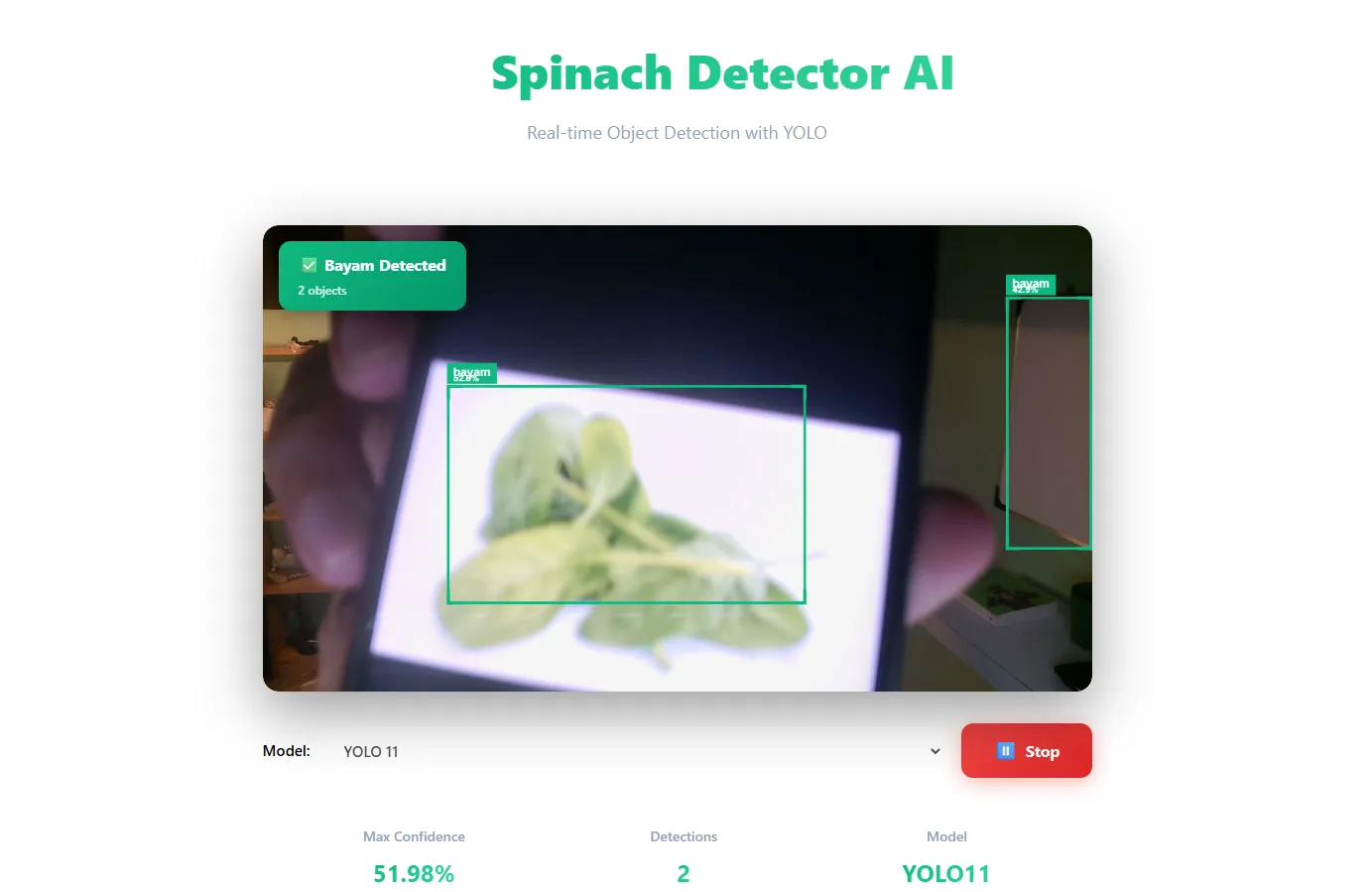
Real-time object detection system for identifying spinach (bayam) using YOLO (You Only Look Once) deep learning models. Built with React (Frontend) and Flask (Backend) for seamless real-time detection with visual bounding boxes and confidence scores.
👨💻 Developer
| Name |
|---|
| Daffa |
🧠 Description
Spinach Detector AI is a computer vision application that uses state-of-the-art YOLO models to detect spinach in real-time through your webcam. The system provides:
- Real-time detection with live camera feed
- Visual bounding boxes with corner brackets (YOLO-style)
- Confidence scores displayed on each detection
- Multiple model support (YOLO 9 and YOLO 11)
- Modern, responsive UI with glassmorphism effects
Perfect for demonstrating object detection capabilities or building custom vegetable recognition systems.
⚙️ Technologies Used
Backend
- Python 3.x
- Flask - Web framework
- Flask-CORS - Cross-origin resource sharing
- Ultralytics YOLO - Object detection models
- Pillow (PIL) - Image processing
Frontend
- React - UI framework
- Vite - Build tool and dev server
- Axios - HTTP client for API requests
- CSS3 - Modern styling with gradients and glassmorphism
- Canvas API - Real-time bounding box visualization
🚀 Getting Started
Prerequisites
- Python 3.8+ installed
- Node.js 16+ and npm installed
- Webcam access
1️⃣ Backend Setup (Flask)
cd backend
pip install flask flask-cors ultralytics pillow
python main.py
The backend server will start on:
http://localhost:5000
2️⃣ Frontend Setup (React)
cd frontend
npm install
npm run dev
The frontend will run on:
http://localhost:5173
🧩 Project Structure
spinach-detector/
├── backend/
│   ├── main.py              # Flask API server
│   ├── models/
│   │   ├── yolo9.pt         # YOLO 9 model weights
│   │   └── yolo11.pt        # YOLO 11 model weights
│   └── requirements.txt
│
├── frontend/
│   ├── src/
│   │   ├── App.js           # Main React component
│   │   ├── index.js         # Entry point
│   │   └── index.css        # Global styles
│   ├── public/
│   └── package.json
│
└── README.md
🧠 How It Works
- User opens the web app and grants camera access
- Selects a YOLO model (YOLO 9 or YOLO 11)
- Starts detection - captures frames every 500ms
- Backend processes each frame with YOLO model
- Returns detection data:
- Bounding box coordinates (normalized 0-1)
- Confidence score for each detection
- Detection status (is_bayam: true/false)
- Frontend draws bounding boxes with:
- Green boxes with corner brackets
- Label showing "bayam" + confidence percentage
- Real-time overlay on video feed
🔌 API Endpoints
POST /predict
Analyzes an image and detects spinach objects.
Request:
- Method:
POST - Content-Type:
multipart/form-data - Body:
image: [image file blob]
model: "yolo11" | "yolo9"
Response:
{
  "is_bayam": true,
  "confidence": 95.67,
  "detections": [
    {
      "x": 0.245,
      "y": 0.312,
      "width": 0.189,
      "height": 0.234,
      "confidence": 95.67
    }
  ]
}
Fields:
is_bayam- Boolean indicating if spinach was detectedconfidence- Maximum confidence score (0-100)detections- Array of detected objects with:x, y- Normalized top-left coordinates (0-1)width, height- Normalized dimensions (0-1)confidence- Detection confidence percentage
✨ Features
🎨 Modern UI Design
- Glassmorphism effects - Frosted glass aesthetic
- Gradient backgrounds - Smooth animated gradients
- Dark theme - Easy on the eyes
- Responsive layout - Works on all screen sizes
- Smooth animations - Fade-in effects and transitions
📦 Real-time Bounding Boxes
- Corner brackets - YOLO-style detection boxes
- Color-coded boxes - Bright green (#10b981)
- Confidence labels - Shows "bayam X.X%" on each detection
- Multiple detections - Supports detecting multiple spinach objects
📊 Stats Dashboard
- Max Confidence - Highest confidence score
- Detection Count - Number of objects detected
- Active Model - Currently selected YOLO model
🎯 Detection Features
- Model switching - Toggle between YOLO 9 and YOLO 11
- Start/Stop controls - Easy detection management
- Status indicator - Shows detection state
- Error handling - Graceful error messages
🎮 Usage Instructions
- Open the app in your browser (
http://localhost:5173) - Allow camera access when prompted
- Select a model:
- YOLO 11 (recommended) - Latest model, better accuracy
- YOLO 9 - Faster but slightly less accurate
- Click "Start Detection"
- Show spinach to the camera:
- Green bounding boxes will appear
- Confidence scores will display
- Multiple spinach objects can be detected simultaneously
- Click "Stop" to pause detection
🔧 Customization
Change Detection Object
To detect different objects, update main.py:
# Line 38 - Change "bayam" to your object class
if model.names[cls].lower() == "your_object_name":
Adjust Detection Speed
In App.js, change the interval (in milliseconds):
// Line 171 - Default is 500ms (2 FPS)
intervalRef.current = setInterval(captureAndDetect, 500);
Customize Bounding Box Color
In App.js, update the color:
// Line 51 - Change to any hex color
const boxColor = "#10b981";  // Green
Add More Models
- Place your
.ptmodel file inbackend/models/ - Update
main.py:
MODELS = {
    "yolo9": YOLO("models/yolo9.pt"),
    "yolo11": YOLO("models/yolo11.pt"),
    "your_model": YOLO("models/your_model.pt"),  # Add this
}
- Update
App.jsselect options:
<option value="your_model">Your Model Name</option>
📸 Screenshots
Main Interface
- Modern glassmorphism design
- Real-time video feed with overlay
- Control panel with model selection
- Stats dashboard
Detection in Action
- Green bounding boxes with corner brackets
- Confidence labels showing percentage
- Multiple simultaneous detections
- Status indicator with object count
🐛 Troubleshooting
Camera Access Denied
- Check browser permissions
- Ensure HTTPS or localhost
- Try different browser
Backend Error
- Verify YOLO models are in
backend/models/ - Check Flask server is running on port 5000
- Install required Python packages
No Detections
- Ensure proper lighting
- Try different YOLO model
- Check model is trained for "bayam" class
- Verify object is visible and in focus
Slow Performance
- Increase detection interval (reduce FPS)
- Use YOLO 9 instead of YOLO 11
- Reduce video resolution
📝 License
This project is open source and available for educational purposes.
🤝 Contributing
Contributions, issues, and feature requests are welcome!
📧 Contact
For questions or support, please contact the developer.
🙏 Acknowledgments
- Ultralytics YOLO - Object detection models
- React - Frontend framework
- Flask - Backend framework
- Google Fonts (Inter) - Typography
Built with ❤️ using YOLO AI