RootFacts - AI Vegetable Detector
Real-time vegetable detection PWA using TensorFlow.js and Transformers.js with AI-generated fun facts
reactvitetensorflow.jstransformers.jspwacomputer-vision
Share this project:
Project Overview
🥦 RootFacts - AI Vegetable Detector
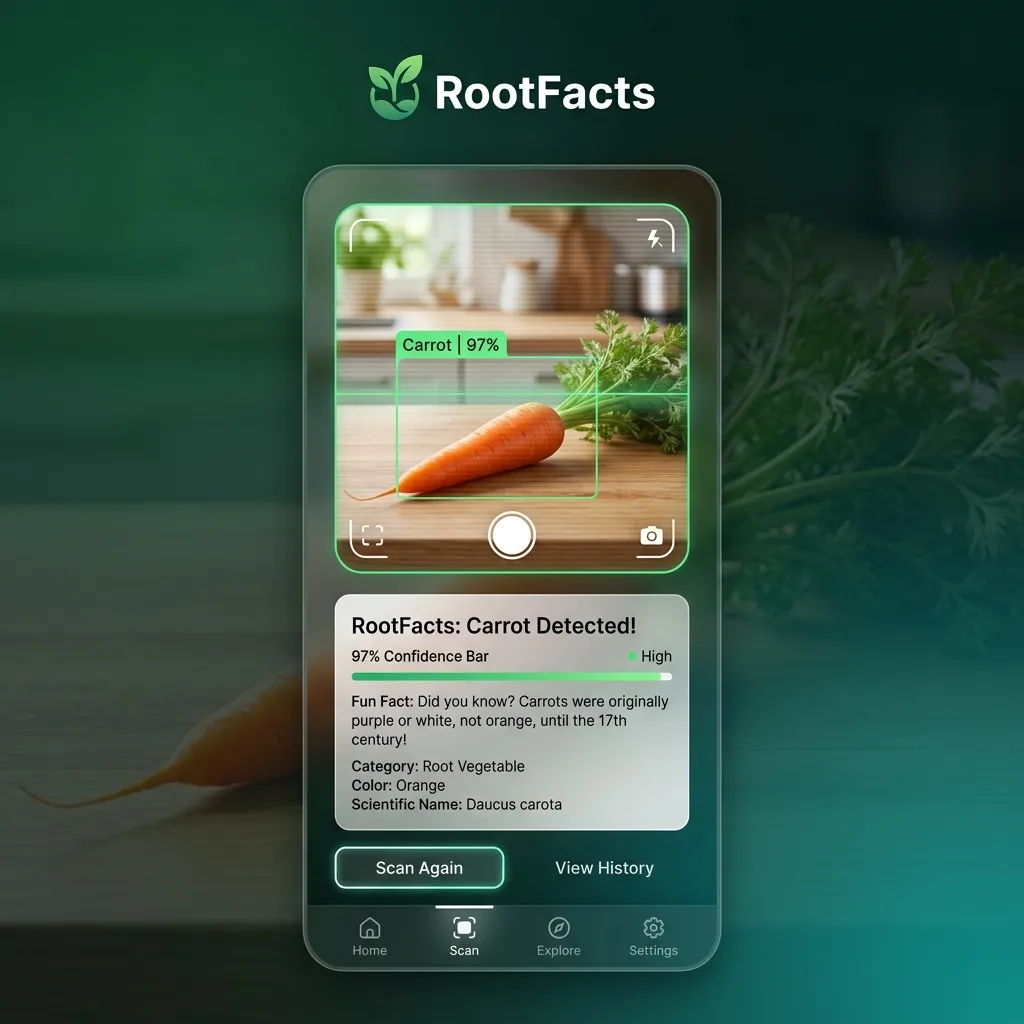
A Progressive Web App that detects vegetables in real-time using TensorFlow.js (Computer Vision) and generates fun facts about them using Transformers.js (Generative AI) — all running 100% in the browser, no server required.
👨💻 Developer
| Name |
|---|
| Daffa |
🧠 Description
RootFacts is a browser-based AI application that combines two powerful machine learning capabilities:
- Computer Vision — Identifies 18 different vegetables from your camera feed using a Teachable Machine model powered by TensorFlow.js
- Generative AI — Produces fun facts about the detected vegetable using a Flan-T5 language model via Transformers.js
- Offline-First PWA — Works completely offline after initial load with service worker caching
Detectable Vegetables (18 Classes)
| 🫱 Beetroot | 🌶️ Paprika | 🥬 Cabbage | 🥕 Carrot |
| 🥦 Cauliflower | 🌶️ Chilli | 🌽 Corn | 🥒 Cucumber |
| 🍆 Eggplant | 🧄 Garlic | 🫚 Ginger | 🥬 Lettuce |
| 🧅 Onion | 🫛 Peas | 🥔 Potato | 🫱 Turnip |
| 🫘 Soybean | 🥬 Spinach |
⚙️ Technologies Used
AI & Machine Learning
- TensorFlow.js
v4.22— On-device ML inference with adaptive backend (WebGPU → WebGL fallback) - Transformers.js
v3.8— Hugging Face models in the browser (WebGPU → WASM fallback) - Teachable Machine — Pre-trained image classification model (MobileNet-based)
- Xenova/flan-t5-small — Quantized text-generation model (
q4dtype)
Frontend
- React
v19— UI framework - Vite
v6— Build tool and dev server - Lucide React — Icon system
- CSS3 — Modern styling with glassmorphism and animations
PWA & Offline
- vite-plugin-pwa — Service worker generation
- Workbox — Precaching and runtime caching strategies
🚀 Getting Started
Prerequisites
- Node.js 18+ and npm installed
- A device with a webcam (or smartphone camera)
- Modern browser with WebGPU or WebGL support
Installation
# Clone the repository
git clone <repo-url>
cd submission

# Install dependencies
npm install

# Start development server
npm run dev
The app will run on:
http://localhost:3001
Production Build
npm run build
npm run preview
🧩 Project Structure
submission/
├── public/
│   ├── model/
│   │   ├── model.json           # TF.js model topology
│   │   ├── metadata.json        # Labels & config (18 classes)
│   │   └── weights.bin          # Model weights
│   ├── icons/
│   │   ├── icon-192x192.png     # PWA icon
│   │   ├── icon-512x512.png     # PWA icon
│   │   └── apple-touch-icon.png # iOS icon
│   └── favicon.ico
│
├── src/
│   ├── components/
│   │   ├── Header.jsx           # App header with model status
│   │   ├── CameraSection.jsx    # Camera feed, controls & settings
│   │   └── InfoPanel.jsx        # Detection results & fun facts
│   ├── hooks/
│   │   └── useAppState.js       # Global state management (useReducer)
│   ├── services/
│   │   ├── DetectionService.js  # TensorFlow.js model loading & prediction
│   │   ├── CameraService.js     # WebRTC camera stream management
│   │   └── RootFactsService.js  # Transformers.js text generation
│   ├── utils/
│   │   └── config.js            # App config, tones, thresholds
│   ├── App.jsx                  # Main app with detection loop
│   ├── main.jsx                 # Entry point
│   └── index.css                # Global styles
│
├── index.html                   # HTML template with PWA meta tags
├── vite.config.js               # Vite + PWA plugin config
├── package.json
├── STUDENT.txt                  # Deployment URL
├── README.md                    # This file (English)
└── README.id.md                 # Indonesian version
🧠 How It Works
┌─────────────┐    ┌──────────────────┐    ┌───────────────────┐
│   Camera     │───▶│  TensorFlow.js   │───▶│  Transformers.js  │
│   Stream     │    │  (Detection)     │    │  (Fun Fact Gen)   │
└─────────────┘    └──────────────────┘    └───────────────────┘
       │                    │                        │
  getUserMedia()     predict() with         generateFacts() with
  WebRTC API         await data() (async)   Flan-T5-small (q4)
                     Manual tensor          Dynamic tone prompts
                     disposal               (funny/professional/
                     WebGPU → WebGL         casual/normal)
- Model Loading — Both AI models load in parallel on app startup
- Camera Activation — User taps "Mulai Scan" to start WebRTC camera stream
- Real-time Detection — Frames are captured and fed to TensorFlow.js every 100ms
- Confidence Check — Only detections above 70% confidence are accepted
- Fun Fact Generation — Detected vegetable name is sent to Flan-T5 with tone-based prompts
- Display Results — Vegetable name, confidence bar, and fun fact are shown
- Copy & Share — Users can copy the fun fact to clipboard
✨ Features
🎯 Computer Vision
- Adaptive Backend — WebGPU (fastest) with WebGL fallback
- Async Inference — Uses
await tensor.data()for WebGPU compatibility - Memory Management — Manual tensor disposal (no memory leaks)
- 18-class Detection — Recognizes a wide variety of vegetables
- Configurable Threshold — 70% confidence minimum
🤖 Generative AI
- On-device Text Generation — No API calls needed
- 4 Tone Modes — Normal, Funny (Lucu), Professional (Profesional), Casual (Santai)
- Quantized Model —
q4dtype for fast loading and small size - Adaptive Backend — WebGPU with WASM fallback
📱 PWA & Offline
- Installable — Add to home screen on mobile
- Offline Support — Service worker caches all assets
- Model Caching — TF.js model files precached via Workbox
- Runtime Caching — Hugging Face model downloads cached for offline reuse
🎨 UI/UX
- Mobile-first Design — Optimized for smartphone usage
- Real-time Camera Feed — Smooth video streaming
- Loading States — Clear feedback during model loading and analysis
- Copy to Clipboard — One-tap fun fact sharing
- FPS Control — Adjustable frame rate (15-60 FPS)
- Camera Switching — Front/back camera toggle
🎮 Usage Instructions
- Open the app and wait for "Model AI Siap" (AI Model Ready) status
- Tap the scan button (green circle) to start the camera
- Point at a vegetable — the app detects it automatically
- Read the fun fact generated about the detected vegetable
- Change the tone — switch between funny, professional, casual, or normal
- Copy the fact — tap the copy button to share with friends
- Stop scanning — tap the button again to stop
🔧 Configuration
Detection Threshold
In src/utils/config.js:
export const APP_CONFIG = {
  detectionConfidenceThreshold: 70,  // Minimum confidence (0-100)
  analyzingDelay: 2000,              // Delay before generating fact
  factsGenerationDelay: 2000,        // Delay after fact is generated
  detectionRetryInterval: 100        // Detection loop interval (ms)
};
Tone Modes
export const TONE_CONFIG = {
  availableTones: [
    { value: 'normal', label: 'Normal' },
    { value: 'funny', label: 'Lucu' },
    { value: 'professional', label: 'Profesional' },
    { value: 'casual', label: 'Santai' }
  ]
};
Change AI Model
In src/services/RootFactsService.js:
// Replace with any Hugging Face text2text model
this.generator = await pipeline('text2text-generation', 'Xenova/flan-t5-small', {
  dtype: 'q4',
  device: this.currentBackend
});
🐛 Troubleshooting
Camera Not Working
- Check browser permissions for camera access
- On desktop: the app falls back to
{ video: true }iffacingModefails - Ensure HTTPS or localhost (camera requires secure context)
Model Loading Slow
- First load downloads ~100MB+ of model data
- Subsequent loads use browser cache (much faster)
- Check network tab in DevTools for download progress
WebGPU Warning
"The powerPreference option is currently ignored"— Safe to ignore, Chrome bug"Some nodes were not assigned to preferred execution providers"— Normal ONNX Runtime behavior
No Detection
- Ensure good lighting conditions
- Hold the vegetable clearly in frame
- Check if the vegetable is one of the 18 supported classes
📝 License
This project is open source and available for educational purposes.
🤝 Contributing
Contributions, issues, and feature requests are welcome!
🙏 Acknowledgments
- TensorFlow.js — Browser-based ML inference
- Hugging Face Transformers.js — On-device language models
- Google Teachable Machine — Easy model training
- Vite — Lightning-fast build tool
- Workbox — Service worker tooling
Built with ❤️ using TensorFlow.js & Transformers.js