Portfolio 2.0
My second portfolio website showcasing evolved web development skills with modern design and improved user experience
Share this project:
Project Overview
Portfolio 2.0
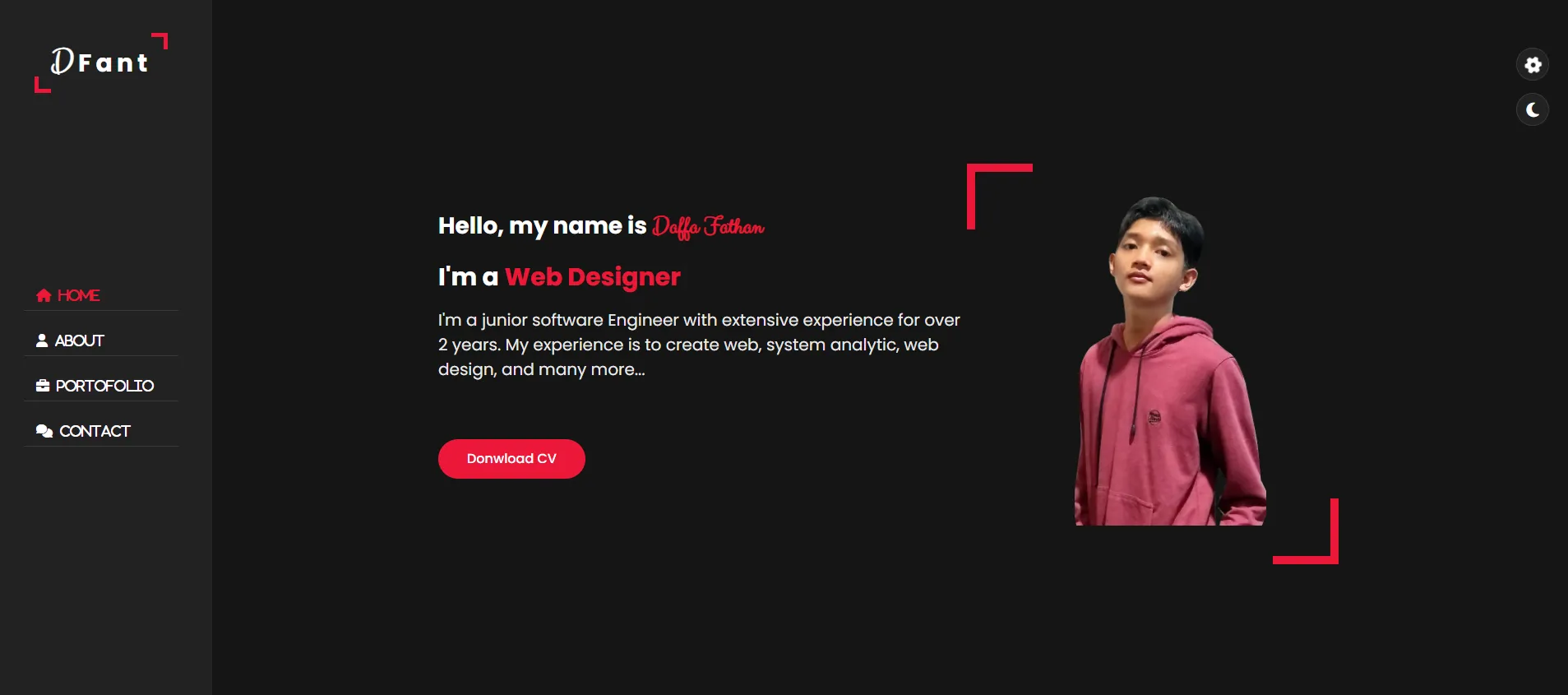
My second portfolio website, representing growth and evolution in web development skills. This iteration features improved design, better user experience, and showcases projects with enhanced presentation.
📋 Overview
Portfolio 2.0 (Portofolio ke 2) is the second iteration of my personal portfolio website. Built after gaining more experience in web development, this version demonstrates significant improvement in design principles, code quality, and overall user experience compared to my first portfolio.
✨ Features
Design & UI
- Modern Layout: Clean, professional design
- Responsive Design: Optimized for all devices
- Smooth Animations: Engaging user interactions
- Professional Typography: Readable, aesthetic fonts
- Color Scheme: Carefully chosen color palette
- Visual Hierarchy: Clear information structure
Content Sections
- Hero Section: Eye-catching introduction
- About Me: Professional background and skills
- Projects Showcase: Portfolio of work
- Skills & Technologies: Technical competencies
- Contact Information: Ways to connect
- Resume/CV: Downloadable PDF resume
Interactive Elements
- Smooth Scrolling: Seamless navigation
- Hover Effects: Interactive UI components
- Form Validation: Contact form with validation
- Dynamic Content: JavaScript-powered features
- Mobile Menu: Responsive navigation
🛠️ Technologies Used
- HTML5: Semantic markup
- CSS3: Advanced styling
- Flexbox & Grid layouts
- CSS animations
- Media queries
- CSS variables
- JavaScript: Interactive features
- Vanilla JS (no frameworks)
- DOM manipulation
- Event handling
- Docker: Containerization (dockerfile included)
📁 Project Structure
portofolio-2/
├── index.html              # Main HTML file
├── css/
│   ├── style.css          # Main stylesheet
│   ├── responsive.css     # Mobile styles
│   ├── animations.css     # Animation effects
│   └── components.css     # Component styles
├── js/
│   ├── main.js           # Core JavaScript
│   └── animations.js     # Animation scripts
├── images/
│   ├── profile.jpg       # Profile photo
│   ├── projects/         # Project screenshots
│   └── icons/           # Icon assets
├── CV.pdf                # Resume PDF (2.4 MB)
├── dockerfile            # Docker configuration
└── README.md
🚀 Getting Started
Prerequisites
- Modern web browser (Chrome, Firefox, Safari, Edge)
- (Optional) Local development server
- (Optional) Docker for containerized deployment
Running Locally
Option 1: Direct Open
# Clone repository
git clone <repository-url>
cd portofolio-2

# Open in browser
# Simply double-click index.html
Option 2: Local Server
Using Python:
# Python 3
python -m http.server 8000

# Python 2
python -m SimpleHTTPServer 8000
Using Node.js:
npx http-server -p 8000
Using PHP:
php -S localhost:8000
Option 3: Docker
# Build Docker image
docker build -t portfolio-2 .

# Run container
docker run -p 8080:80 portfolio-2
Access at: http://localhost:8000 (or http://localhost:8080 for Docker)
💻 Sections
1. Header & Navigation
- Logo/brand
- Navigation menu
- Mobile hamburger menu
- Smooth scroll links
2. Hero Section
- Greeting/tagline
- Name and title
- Call-to-action buttons
- Background effect
3. About Me
- Professional introduction
- Skills overview
- Education background
- Interests and hobbies
4. Skills
- Technical skills grid
- Skill level indicators
- Technology stack icons
- Continuous learning message
5. Projects
- Project cards with images
- Project descriptions
- Technologies used
- Live demo & GitHub links
6. Experience (if applicable)
- Work history
- Internships
- Freelance projects
- Volunteer work
7. Contact
- Contact form
- Email address
- Social media links
- LinkedIn profile
8. Footer
- Copyright information
- Additional links
- Social icons
🎨 Design Improvements from Portfolio 1.0
What's Better
- Visual Design: More polished and professional appearance
- Code Quality: Better organized, commented code
- Performance: Optimized images and assets
- Accessibility: Improved semantic HTML and ARIA labels
- Responsiveness: Better mobile experience
- User Experience: Smoother interactions and animations
- Content: More detailed project showcases
Key Differences
- Modern color palette vs basic colors
- Advanced CSS layouts (Grid/Flexbox) vs simple layouts
- Custom animations vs none
- Professional typography vs default fonts
- Optimized images vs unoptimized
- Better project presentation vs basic list
🎯 Design Principles Applied
- Visual Hierarchy: Clear importance structure
- Whitespace: Breathing room for content
- Consistency: Uniform design language
- Contrast: Readable text and elements
- Alignment: Grid-based organization
- Repetition: Consistent patterns
- Color Theory: Harmonious palette
📱 Responsive Breakpoints
/* Mobile First Approach */
/* Small devices (phones, 320px and up) */
@media (min-width: 320px) { }

/* Medium devices (tablets, 768px and up) */
@media (min-width: 768px) { }

/* Large devices (desktops, 1024px and up) */
@media (min-width: 1024px) { }

/* Extra large devices (large desktops, 1280px and up) */
@media (min-width: 1280px) { }
🔧 Customization
Update Personal Information
Edit index.html:
<h1>Your Name</h1>
<p>Your Title/Role</p>
<p>Your bio here...</p>
Change Colors
Edit CSS variables in css/style.css:
:root {
  --primary-color: #yourcolor;
  --secondary-color: #yourcolor;
  --accent-color: #yourcolor;
  --text-color: #yourcolor;
  --bg-color: #yourcolor;
}
Add New Project
Add project card in index.html:
<div class="project-card">
  <img src="images/projects/project-name.jpg" alt="Project">
  <h3>Project Name</h3>
  <p>Project description</p>
  <div class="tech-tags">
    <span>HTML</span>
    <span>CSS</span>
    <span>JS</span>
  </div>
  <div class="project-links">
    <a href="demo-url">Live Demo</a>
    <a href="github-url">GitHub</a>
  </div>
</div>
🐛 Troubleshooting
Styles Not Applying
- Check CSS file paths
- Clear browser cache
- Verify CSS syntax
Images Not Loading
- Check image paths
- Verify image files exist
- Check file extensions
JavaScript Not Working
- Open browser console (F12)
- Check for errors
- Verify script order
Docker Build Fails
- Check Dockerfile syntax
- Ensure proper base image
- Verify port configuration
🚀 Deployment
GitHub Pages
- Push to GitHub repository
- Settings → Pages
- Source: main branch
- Save
Netlify
# Continuous deployment
netlify deploy --prod
Vercel
vercel --prod
📝 Resume/CV
The CV.pdf file (2.4 MB) contains my professional resume. Update it regularly to reflect:
- Latest skills
- Recent projects
- New experiences
- Updated contact info
🎓 Learning Outcomes
Building this second portfolio taught me:
- Advanced CSS techniques
- Better JavaScript practices
- Improved design sense
- Performance optimization
- Responsive design mastery
- Attention to detail
- Professional presentation
💭 Reflection
This second portfolio represents significant growth from my first attempt. It showcases not just my projects, but my evolution as a developer. The attention to design details, code quality, and user experience demonstrates my commitment to continuous improvement.
🔄 Version History
- Portfolio 1.0: First attempt, basic layout
- Portfolio 2.0: Current version, improved design
- Portfolio 3.0: (Future) with modern frameworks
🤝 Contributing
While this is a personal portfolio, feedback and suggestions are always welcome!
📄 License
Personal project - available for inspiration and learning.
Portfolio Evolution 💼✨
Showcasing growth, one website at a time!