First Website
My first website project while learning web development fundamentals
Share this project:
Project Overview
My First Website
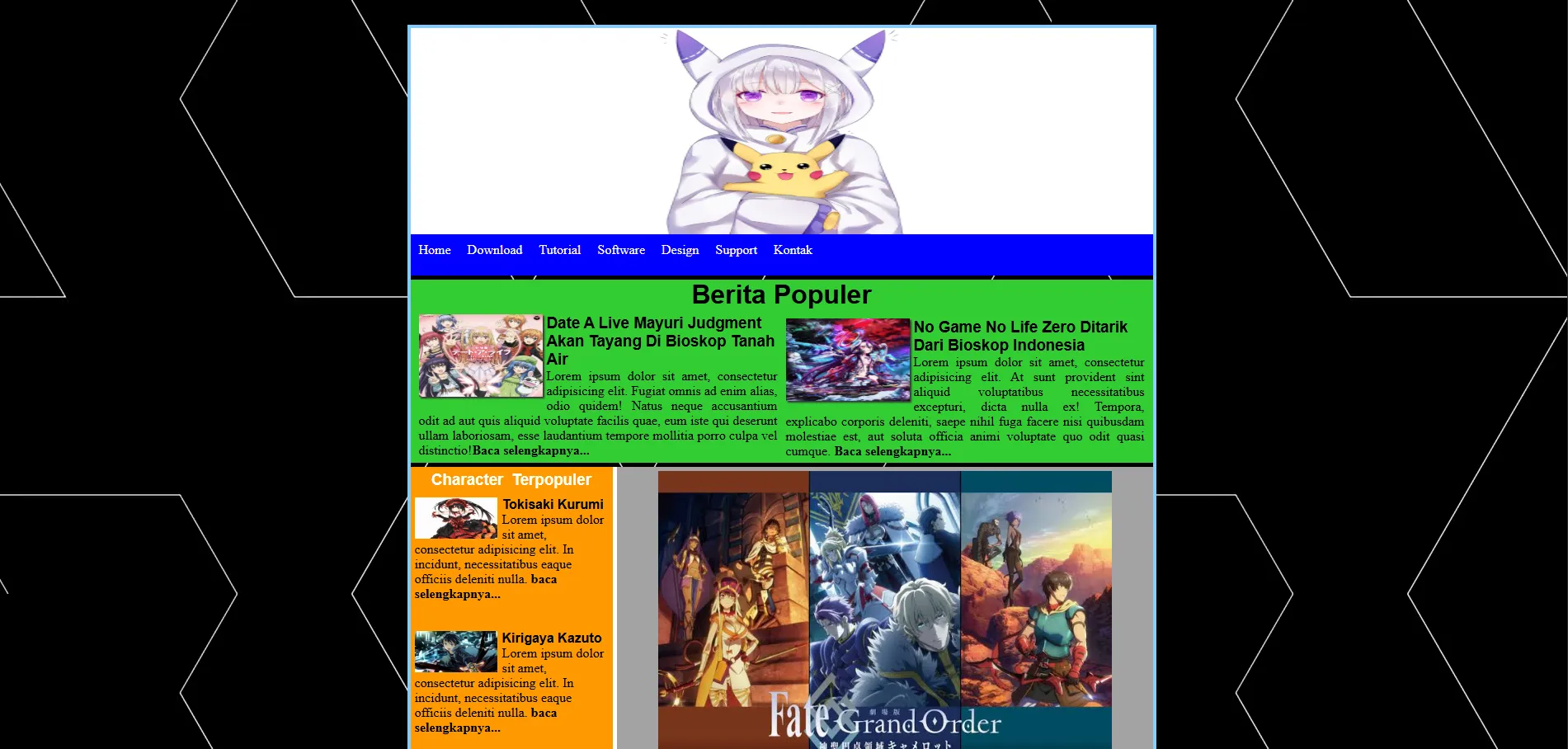
A personal milestone project - my very first website created while learning the fundamentals of web development. This project represents the beginning of my journey into web development, built with pure HTML, CSS, and JavaScript.
📋 Overview
This is the first website I ever built when I started learning web development. It serves as a testament to my learning journey and showcases basic web development skills including HTML structure, CSS styling, and JavaScript interactivity.
✨ Features
- Basic HTML Structure: Semantic HTML5 elements
- CSS Styling: Custom styles for layout and design
- JavaScript Interactions: Simple interactive elements
- Responsive Design: Mobile-friendly layout
- Clean Code: Well-organized and commented code
🛠️ Technologies Used
- HTML5: Page structure and content
- CSS3: Styling and layout
- JavaScript: Basic interactivity
- No Frameworks: Built from scratch to learn fundamentals
📁 Project Structure
first_wesbite/
├── index.html          # Main HTML file
├── about.html          # About page
├── assets/
│   ├── css/
│   │   └── style.css  # Main stylesheet
│   ├── js/
│   │   └── script.js  # JavaScript file
│   └── img/           # Images folder
├── loader.gif          # Loading animation
├── project/            # Projects showcase
└── projects.html       # Projects page
🚀 Getting Started
Prerequisites
-A web browser (Chrome, Firefox, Safari, or Edge)
- (Optional) A local server for development
Running the Website
Option 1: Direct File Open
- Clone or download the repository
- Navigate to the project folder
- Double-click
index.htmlto open in your default browser
Option 2: Local Server (Recommended)
Using Python:
# Python 3
python -m http.server 8000

# Python 2
python -m SimpleHTTPServer 8000
Using Node.js (with http-server):
npx http-server -p 8000
Using VS Code:
- Install "Live Server" extension
- Right-click on
index.html - Select "Open with Live Server"
Then visit: http://localhost:8000
💻 Pages
Home (index.html)
- Welcome section
- Brief introduction
- Navigation to other pages
- Featured content
About (about.html)
- Personal information
- Learning journey
- Skills overview
- Contact information
Projects (projects.html)
- Showcase of early projects
- Project descriptions
- Technologies used
- Links to project demos
🎨 Features Implemented
HTML Features
- Semantic HTML5 elements (
<header>,<nav>,<section>,<footer>) - Proper document structure
- Accessible markup
- Meta tags for SEO
CSS Features
- Custom color scheme
- Flexbox layout
- Hover effects
- Transitions and animations
- Responsive media queries
JavaScript Features
- DOM manipulation
- Event listeners
- Simple animations
- Interactive Elements
- Loading animations
📚 What I Learned
Building this first website taught me:
-
HTML Foundations
- Document structure
- Semantic elements
- Forms and inputs
- Links and navigation
-
CSS Basics
- Selectors and specificity
- Box model
- Positioning
- Flexbox layout
- Responsive design
-
JavaScript Fundamentals
- Variables and data types
- Functions
- DOM manipulation
- Event handling
- Basic animations
-
Web Development Workflow
- File organization
- Code comments
- Testing in browsers
- Debugging basics
💡 Personal Message
"Keep learning and never give up, because you can do it!"
This message is a reminder to myself and to everyone starting their web development journey. This first website may be simple, but it represents the first step in a continuous learning process. Every expert was once a beginner.
🔧 Future Improvements
Things I would add if I were to rebuild this now:
- Modern CSS frameworks (Tailwind, Bootstrap)
- JavaScript frameworks (React, Vue)
- Better accessibility features
- Improved SEO optimization
- Modern build tools (Vite, Webpack)
- Version control integration
🎓 Learning Resources
Resources that helped me build this:
- MDN Web Docs
- W3Schools
- FreeCodeCamp
- YouTube tutorials
- Online coding communities
📝 Reflections
Looking back at this first project:
- Proud moments: Successfully deploying my first website
- Challenges faced: Understanding CSS positioning and JavaScript scope
- Key takeaways: Fundamentals matter more than frameworks
- Next steps: Continue learning and building more complex projects
🤝 For Beginners
If you're just starting out like I was:
- Start Simple: Don't try to build complex sites immediately
- Practice Daily: Code a little bit every day
- Learn Fundamentals: Master HTML, CSS, and JavaScript basics
- Build Projects: Theory is important, but practice is crucial
- Don't Compare: Everyone's journey is different
- Ask Questions: The coding community is helpful
- Stay Persistent: It gets easier with practice
📄 License
This project is open source and available for educational purposes. Feel free to use this as a learning reference!
🌟 Inspiration
This project was inspired by:
- The desire to create something from scratch
- Tutorials and courses I followed as a beginner
- The amazing web development community
From a beginner to beginners: You've got this! 💪
Remember: Every professional developer started exactly where you are now. Keep building, keep learning, and never give up!