Fanthom Store Web Practice
E-commerce store website built with HTML, CSS and native PHP for learning web development
Share this project:
Project Overview
Fanthom Store - Web Practice Project
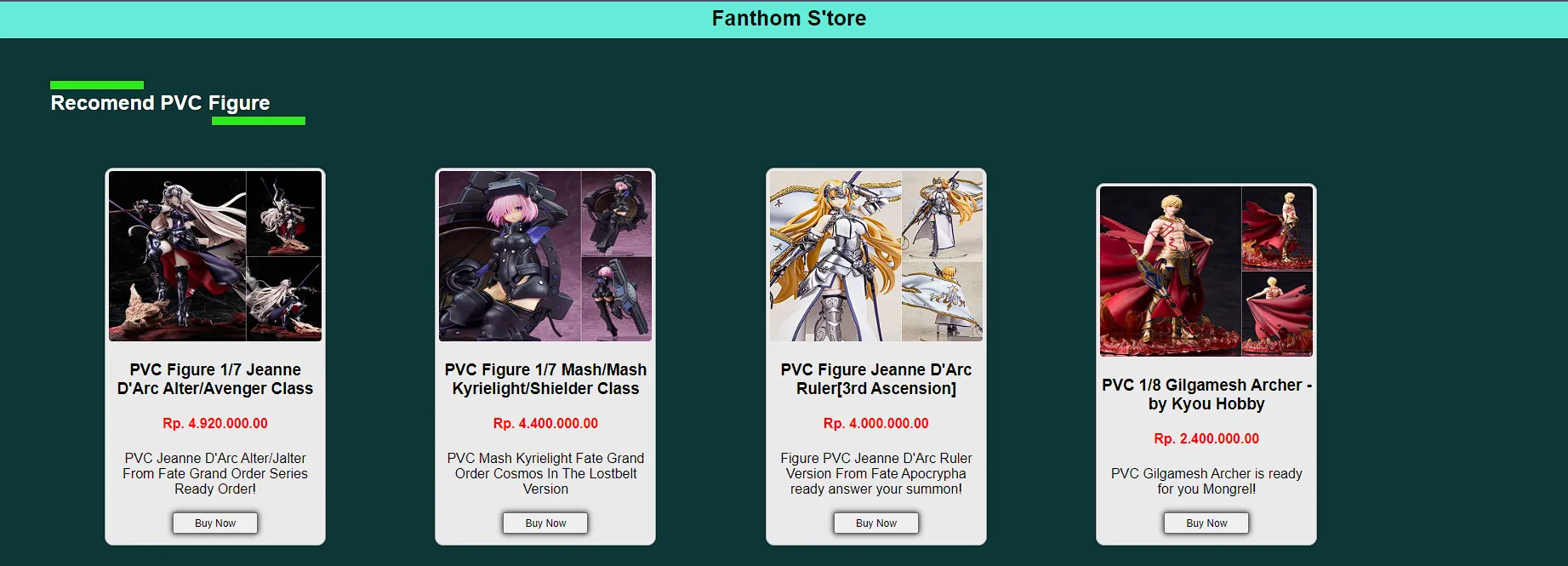
A simple e-commerce store website built with HTML, CSS, and native PHP as a web programming practice project. This application demonstrates fundamental web development concepts and basic online store functionality.
📋 Overview
Fanthom Store is a web programming practice project (UPRAK - Ujian Praktik) that showcases a basic e-commerce website. Built with native technologies without frameworks, it provides hands-on experience with PHP, MySQL, and frontend development.
✨ Features
-
Product Catalog
- Browse available products
- View product details
- Product images and descriptions
- Price display
-
Shopping Cart
- Add products to cart
- View cart items
- Update quantities
- Remove items
-
Basic E-commerce Flow
- Product listing page
- Product detail pages
- Shopping cart page
- Checkout process
-
Admin Features (if implemented)
- Product management
- Order viewing
- Stock updates
🛠️ Technologies Used
- HTML5: Web structure
- CSS3: Styling and layout
- PHP: Server-side logic
- MySQL: Database management
- JavaScript: Client-side interactions
📁 Project Structure
web-uprak-fanthom-store/
├── index.php              # Homepage/Product catalog
├── product.php            # Product detail page
├── cart.php              # Shopping cart
├── checkout.php          # Checkout process
├── img/                  # Product images
├── style.css             # Main stylesheet
├── fathom_store.sql      # Database schema
├── .gitignore
└── README.md
🚀 Getting Started
Prerequisites
- XAMPP or WAMP server
- PHP 7.4.1 or higher
- MySQL database
- Web browser
Installation Steps
-
Clone Repository
git clone <repository-url> -
Move to Server Directory
Copy project to htdocs (XAMPP) or www (WAMP):
# XAMPP cp -r web-uprak-fanthom-store C:/xampp/htdocs/ # WAMP cp -r web-uprak-fanthom-store C:/wamp64/www/ -
Start XAMPP/WAMP
- Start Apache server
- Start MySQL database
-
Create Database
- Open phpMyAdmin:
http://localhost/phpmyadmin - Create new database named
fathom_store
- Open phpMyAdmin:
-
Import Database
- Select
fathom_storedatabase - Click "Import" tab
- Choose file:
fathom_store.sql - Click "Go" to import tables and data
- Select
-
Configure Database Connection
Edit database configuration file (usually
config.phpor connection section):<?php $host = "localhost"; $user = "root"; $pass = ""; $db = "fathom_store"; $conn = mysqli_connect($host, $user, $pass, $db); ?> -
Access Website
Open browser and navigate to:
http://localhost/web-uprak-fanthom-storeOr:
http://localhost/fathom_store
💻 Usage
Browsing Products
- Visit homepage to see all products
- Products displayed in grid layout
- Click product for detailed view
Adding to Cart
- On product page, click "Add to Cart"
- Select quantity
- Item added to shopping cart
- Cart icon/counter updates
Shopping Cart
- Click cart icon to view items
- See all selected products
- Update quantities or remove items
- View total price
- Proceed to checkout
Checkout (if implemented)
- Review cart items
- Enter shipping information
- Choose payment method
- Confirm order
🗄️ Database Schema
Main Tables
products
CREATE TABLE products (
    id INT AUTO_INCREMENT PRIMARY KEY,
    name VARCHAR(100),
    description TEXT,
    price DECIMAL(10,2),
    image VARCHAR(255),
    stock INT DEFAULT 0,
    created_at TIMESTAMP DEFAULT CURRENT_TIMESTAMP
);
cart (session or database)
CREATE TABLE cart (
    id INT AUTO_INCREMENT PRIMARY KEY,
    product_id INT,
    quantity INT,
    session_id VARCHAR(100),
    FOREIGN KEY (product_id) REFERENCES products(id)
);
orders (if implemented)
CREATE TABLE orders (
    id INT AUTO_INCREMENT PRIMARY KEY,
    customer_name VARCHAR(100),
    total DECIMAL(10,2),
    status VARCHAR(50),
    order_date TIMESTAMP DEFAULT CURRENT_TIMESTAMP
);
🎨 UI Components
Homepage
- Header with logo and navigation
- Product grid/list
- Footer with information
Product Card
- Product image
- Product name
- Price
- "Add to Cart" button
Product Detail Page
- Large product image
- Detailed description
- Price
- Quantity selector
- Add to cart button
Shopping Cart
- Cart items list
- Quantity controls
- Remove button
- Subtotal per item
- Total price
- Checkout button
🔒 Security Considerations
For learning purposes, but consider for production:
- Input validation and sanitization
- SQL injection prevention (use prepared statements)
- XSS protection
- CSRF tokens for forms
- Secure session management
- Password hashing (if user accounts added)
🐛 Troubleshooting
Database Connection Failed
- Verify MySQL is running
- Check database credentials
- Ensure database
fathom_storeexists
Images Not Displaying
- Check file paths in code
- Verify images are in
img/folder - Check file permissions
Products Not Showing
- Verify database has been imported
- Check SQL queries for errors
- Enable PHP error reporting
Cart Not Working
- Check if sessions are enabled
- Verify cart table exists
- Check JavaScript console for errors
🚀 Future Enhancements
Potential improvements:
- User registration/login
- Product search functionality
- Category filtering
- Product reviews and ratings
- Wishlist feature
- Order history
- Payment gateway integration
- Email notifications
- Admin dashboard
- Responsive mobile design
- Product variants (size, color)
🎓 Learning Outcomes
This practice project teaches:
- PHP fundamentals
- MySQL database operations
- HTML/CSS web design
- Session management
- Shopping cart logic
- Basic e-commerce flow
- File structure organization
- Database design
💭 Personal Note
This is my website store built with HTML, CSS, and PHP as a web programming practice project (UPRAK). It demonstrates fundamental e-commerce concepts and was great for learning web development basics!
🤝 Contributing
This is an educational practice project. Feel free to fork and enhance for your own learning!
📄 License
Open source and available for educational purposes.
Built for Web Programming Practice 🛒✨
Simple e-commerce store for learning PHP and MySQL!