PHP CRUD Siswa
Student data CRUD application built with native PHP and MySQL for learning basic web development
Share this project:
Project Overview
PHP Student CRUD Application (CRUD Siswa)
A simple yet comprehensive student data management system built with native PHP and MySQL. This project demonstrates fundamental CRUD (Create, Read, Update, Delete) operations and was created during my high school learning journey.
📋 Overview
This is a student data management application (CRUD Siswa) that allows schools to manage student records efficiently. Built with native PHP without frameworks, it serves as an excellent learning project for understanding web development fundamentals and database operations.
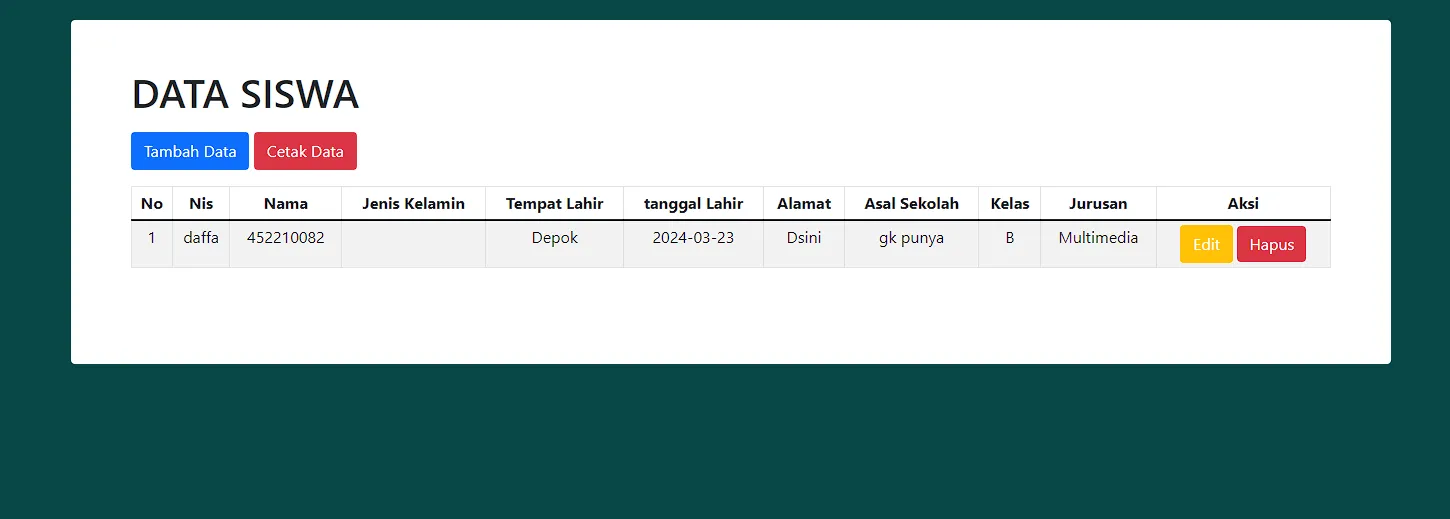
✨ Features
-
Student Management (CRUD)
- Add new student records
- View all students in a table
- Edit existing student information
- Delete student records
-
Data Management
- Student ID (NIS)
- Student name
- Class/Grade
- Address
- Phone number
- Date of birth
-
User Interface
- Clean, responsive design
- Bootstrap-based layout
- Data tables with sorting
- Form validation
- Success/error notifications
-
Database Operations
- Secure MySQL connections
- Prepared statements (if used)
- Data validation
- Error handling
🛠️ Technologies Used
- PHP (Native): Server-side programming
- MySQL: Database management
- Bootstrap: Frontend framework
- HTML5: Structure
- CSS3: Styling
- JavaScript: Client-side interactions
📁 Project Structure
php_crud_siswa/
├── src/
│   ├── index.php          # Main page (view students)
│   ├── tambah.php         # Add student form
│   ├── edit.php           # Edit student form
│   ├── hapus.php          # Delete student
│   ├── proses_tambah.php  # Process add
│   ├── proses_edit.php    # Process edit
│   └── koneksi.php        # Database connection
├── assets/
│   ├── css/
│   │   └── style.css      # Custom styles
│   └── js/
│       └── script.js      # Custom scripts
├── databases/
│   └── uprakweb2020.sql   # Database schema
├── .gitignore
└── README.md
🚀 Getting Started
Prerequisites
- XAMPP, WAMP, or similar PHP development environment
- PHP 7.0 or higher
- MySQL 5.7 or higher
- Web browser
Installation Steps
-
Clone Repository
git clone <repository-url> -
Move to htdocs
Copy project folder to your XAMPP/WAMP htdocs directory:
# For XAMPP cp -r php_crud_siswa C:/xampp/htdocs/ # For WAMP cp -r php_crud_siswa C:/wamp64/www/ -
Create Database
Open phpMyAdmin (
http://localhost/phpmyadmin)- Create new database named
uprakweb2020
- Create new database named
-
Import Database
- Select the
uprakweb2020database - Click "Import" tab
- Choose file:
databases/uprakweb2020.sql - Click "Go" to import
- Select the
-
Configure Database Connection
Edit
src/koneksi.phpif needed:<?php $host = "localhost"; $user = "root"; $pass = ""; $db = "uprakweb2020"; $conn = mysqli_connect($host, $user, $pass, $db); if (!$conn) { die("Connection failed: " . mysqli_connect_error()); } ?> -
Start XAMPP/WAMP
- Start Apache
- Start MySQL
-
Access Application
Open browser and navigate to:
http://localhost/php_crud_siswa/src
💻 Usage Guide
Viewing Students
- Main page displays all students in a table
- Columns show: NIS, Name, Class, Address, Phone, Actions
- Data is fetched from MySQL database
Adding New Student
- Click "Add Student" or "Tambah Siswa" button
- Fill in the form:
- Student ID (NIS)
- Full Name
- Class/Grade
- Address
- Phone Number
- Date of Birth
- Click "Save" or "Simpan"
- Student added to database
- Redirect to main page with success message
Editing Student Data
- Click "Edit" button on student row
- Form pre-filled with current data
- Modify fields as needed
- Click "Update" or "Perbarui"
- Changes saved to database
- Redirect with success message
Deleting Student
- Click "Delete" or "Hapus" button
- Confirmation dialog appears
- Confirm deletion
- Student removed from database
- Page refreshes with success message
🗄️ Database Schema
Table: siswa
CREATE TABLE `siswa` (
    `id` int(11) NOT NULL AUTO_INCREMENT,
    `nis` varchar(20) NOT NULL,
    `nama` varchar(100) NOT NULL,
    `kelas` varchar(20) NOT NULL,
    `alamat` text,
    `no_telp` varchar(15),
    `tanggal_lahir` date,
    `created_at` timestamp DEFAULT CURRENT_TIMESTAMP,
    PRIMARY KEY (`id`),
    UNIQUE KEY `nis` (`nis`)
);
🎨 UI Features
- Responsive Design: Works on desktop, tablet, and mobile
- Bootstrap Components: Cards, tables, forms, buttons
- Icons: Font Awesome integration
- Alerts: Success and error messages
- Modals: Confirmation dialogs
🔒 Security Considerations
This is a learning project. For production, consider:
- Input sanitization
- Prepared statements (PDO or mysqli_prepare)
- CSRF protection
- XSS prevention
- Password hashing for admin login
- Session management
- SQL injection prevention
🐛 Troubleshooting
Connection Failed
- Ensure MySQL is running in XAMPP/WAMP
- Verify database name and credentials
- Check
koneksi.phpsettings
Table Not Found
- Import
uprakweb2020.sqlproperly - Verify database name matches
Page Not Loading
- Check if Apache is running
- Verify project is in htdocs/www folder
- Check file paths in code
Data Not Saving
- Check MySQL connection
- Verify form action URLs
- Check for PHP errors (enable error_reporting)
🎓 Learning Outcomes
This project taught me:
- Native PHP programming
- MySQL database operations
- CRUD operation implementation
- Form processing
- Session management
- Bootstrap framework
- Basic security practices
- MVC pattern basics (separation of concerns)
🚀 Future Enhancements
Potential improvements:
- User authentication system
- Student photo uploads
- Grade/score management
- Attendance tracking
- Export to PDF/Excel
- Search and filter functionality
- Pagination for large datasets
- Class management module
- Parent information
- Report generation
🤝 Contributing
This is a learning project from my high school days. Feel free to fork and enhance for your own learning!
📄 License
Open source and available for educational purposes.
💭 Personal Note
I built this during high school as one of my early web development projects. It's a simple CRUD application, but it taught me fundamental concepts that I still use today. Every journey starts with simple steps!
Built while learning PHP in High School 🎓📚
A foundation project for understanding web development basics