Rakuen Project
Full-stack web application built with Laravel 11, Inertia.js, and modern frontend stack featuring articles, portfolio, and project management
Share this project:
Project Overview
Rakuen Project
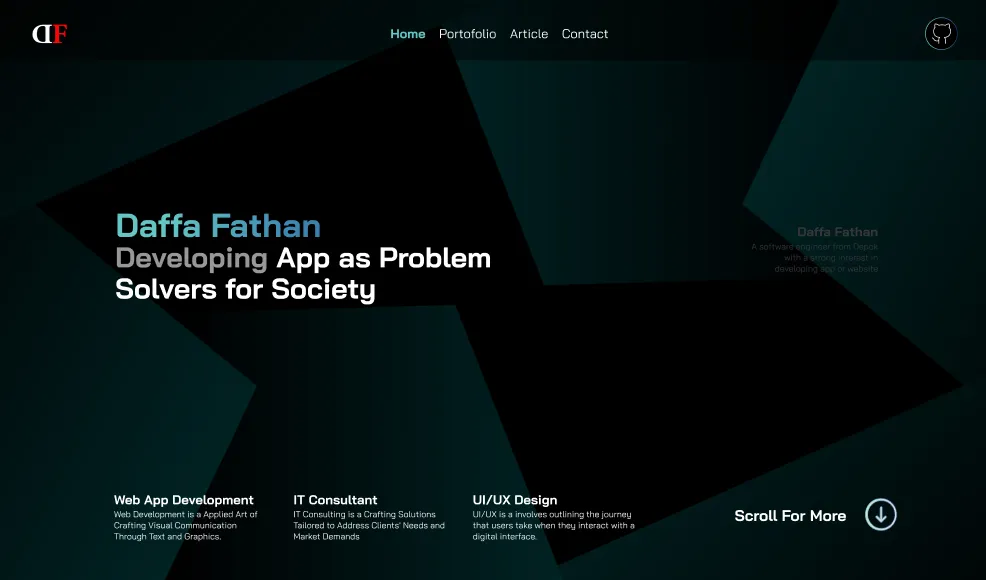
A modern full-stack web application built with Laravel 11 and Inertia.js, featuring a comprehensive content management system for articles, portfolio projects, and image galleries. Designed as a personal portfolio and blogging platform with a clean, professional interface.
📋 Overview
Rakuen Project is a sophisticated web application that combines the power of Laravel 11 backend with the seamless SPA experience of Inertia.js. It provides a complete solution for managing personal or professional content including blog articles, portfolio projects, image galleries, and more.
✨ Features
Content Management
- Articles System: Create, edit, and publish blog posts
- Portfolio Management: Showcase personal projects and work
- Project Gallery: Detailed project presentations
- Category Organization: Organize content with categories
- Image Management: Upload and manage media files
- Rich Text Editor: Enhanced content creation
User Features
- Authentication: Secure user registration and login (Laravel Breeze)
- User Profiles: Manage personal information
- Email Verification: Account verification system
- Password Reset: Secure password recovery
- Profile Management: Update user details and settings
Technical Features
- SPA Experience: Smooth page transitions with Inertia.js
- Modern Frontend: React or Vue.js with Tailwind CSS
- Responsive Design: Mobile-first, works on all devices
- SEO Optimized: Sitemap generation with spatie/laravel-sitemap
- Image Processing: Intervention Image for image manipulation
- Dockerized: Ready for containerized deployment
🛠️ Tech Stack
| Technology | Version | Purpose |
|---|---|---|
| Laravel | 11.x | Backend framework |
| PHP | 8.2+ | Server-side language |
| Inertia.js | 1.0+ | SPA framework |
| React/Vue | Latest | Frontend framework |
| Tailwind CSS | Latest | Utility-first CSS |
| Vite | Latest | Asset bundling & HMR |
| MySQL/PostgreSQL | - | Database |
| Laravel Breeze | 2.0+ | Authentication scaffolding |
| Intervention Image | 3.9+ | Image processing |
| Ziggy | 2.0+ | Laravel routes in JavaScript |
| Pest PHP | 2.0+ | Testing framework |
📁 Project Structure
rakuen-project/
├── app/
│   ├── Http/
│   │   └── Controllers/
│   │       ├── ArticlesController.php
│   │       ├── CategoryController.php
│   │       ├── HomepageController.php
│   │       ├── ImagesController.php
│   │       ├── PortofolioController.php
│   │       ├── ProjectsController.php
│   │       └── ProfileController.php
│   └── Models/
├── database/
│   ├── migrations/
│   └── seeders/
├── resources/
│   ├── js/
│   │   ├── Pages/              # Inertia pages
│   │   ├── Components/         # Reusable components
│   │   └── app.jsx/app.vue    # Entry point
│   └── css/
│       └── app.css            # Tailwind CSS
├── routes/
│   ├── web.php                # Application routes
│   └── api.php               # API routes
├── public/                    # Public assets
├── storage/                   # Uploaded files
├── docker-compose.yml         # Docker configuration
├── Dockerfile                # Docker image
├── tailwind.config.js        # Tailwind config
├── vite.config.js           # Vite config
└── README.md
🚀 Getting Started
Prerequisites
- PHP 8.2 or higher
- Composer (latest version)
- Node.js 18+ and npm/yarn
- MySQL or PostgreSQL
- Docker (optional, for containerized deployment)
Installation Steps
-
Clone the Repository
git clone <repository-url> cd rakuen-project -
Install PHP Dependencies
composer install -
Install Node Dependencies
npm install # or yarn install -
Environment Configuration
Copy the example environment file:
cp .env.example .envGenerate application key:
php artisan key:generateConfigure database in
.env:DB_CONNECTION=mysql DB_HOST=127.0.0.1 DB_PORT=3306 DB_DATABASE=rakuen_db DB_USERNAME=your_username DB_PASSWORD=your_password -
Database Setup
Run migrations:
php artisan migrate(Optional) Seed database with sample data:
php artisan db:seed -
Create Storage Link
php artisan storage:link -
Build Frontend Assets
Development:
npm run devProduction:
npm run build -
Start Development Server
php artisan serve -
Access the Application
http://localhost:8000
Docker Deployment
Using Docker and Docker Compose:
-
Build and Start
docker-compose up -d --build -
Run Migrations
docker-compose exec app php artisan migrate -
Access Application
http://localhost
💻 Usage Guide
Articles Management
-
Create Article
- Navigate to Articles section
- Click "New Article"
- Enter title, content, category
- Add featured image
- Publish or save as draft
-
Edit Article
- Select article from list
- Click "Edit"
- Modify content
- Update and publish
-
Organize with Categories
- Create categories
- Assign articles to categories
- Filter articles by category
Portfolio Management
-
Add Project
- Go to Portfolio section
- Click "Add Project"
- Enter project details:
- Title
- Description
- Technologies used
- Project URL
- GitHub link
- Screenshots/images
- Save project
-
Update Projects
- Edit existing projects
- Update screenshots
- Modify descriptions
Image Gallery
-
Upload Images
- Access Images section
- Upload single or multiple images
- Add captions and alt text
- Organize in galleries
-
Image Processing
- Automatic resizing
- Thumbnail generation
- Format optimization
🎨 Frontend Development
Inertia.js Pages
Pages are located in resources/js/Pages/:
// Example: Articles/Index.jsx
import { Head, Link } from '@inertiajs/react'

export default function Index({ articles }) {
    return (
        <>
            <Head title="Articles" />
            <div className="max-w-7xl mx-auto">
                {articles.map(article => (
                    <ArticleCard key={article.id} article={article} />
                ))}
            </div>
        </>
    )
}
Tailwind CSS
Custom styles in resources/css/app.css:
@tailwind base;
@tailwind components;
@tailwind utilities;

@layer components {
    .btn-primary {
        @apply bg-blue-500 text-white px-4 py-2 rounded hover:bg-blue-600;
    }
}
🔒 Authentication
Laravel Breeze provides:
- Registration
- Login/Logout
- Password reset
- Email verification
- Profile management
Access auth routes:
/register- User registration/login- User login/forgot-password- Password reset
📡 API Routes
Define API endpoints in routes/api.php for external integrations or mobile apps.
🧪 Testing
Run tests with Pest:
# Run all tests
./vendor/bin/pest

# Run specific test
./vendor/bin/pest tests/Feature/ArticlesTest.php

# With coverage
./vendor/bin/pest --coverage
🐛 Troubleshooting
Inertia Version Mismatch
npm install @inertiajs/react@latest @inertiajs/inertia@latest
# or for Vue
npm install @inertiajs/vue3@latest @inertiajs/inertia@latest
Vite Not Starting
npm cache clean --force
rm -rf node_modules package-lock.json
npm install
Image Upload Issues
# Check storage permissions
chmod -R 775 storage
chmod -R 775 bootstrap/cache

# Recreate storage link
php artisan storage:link
🚀 Deployment
Production Optimization
# Optimize autoloader
composer install --optimize-autoloader --no-dev

# Cache configuration
php artisan config:cache
php artisan route:cache
php artisan view:cache

# Build assets
npm run build
Environment Setup
APP_ENV=production
APP_DEBUG=false
APP_URL=https://yourdomain.com

# Database
DB_CONNECTION=mysql
# ... production credentials

# Mail
MAIL_MAILER=smtp
# ... mail settings
📚 Key Laravel 11 Features Used
- Simplified Routes: Streamlined route definitions
- Improved Performance: Enhanced query optimization
- Modern PHP: PHP 8.2+ features
- Enhanced Security: Latest security patches
- Better Testing: Pest PHP integration
- Type Safety: Improved type hinting
🎯 Use Cases
- Personal portfolio website
- Professional blog
- Project showcase platform
- Content management system
- Articles and news publication
- Image gallery site
🤝 Contributing
Contributions welcome! Please follow:
- Fork the repository
- Create feature branch
- Commit changes
- Push to branch
- Open pull request
📄 License
The Laravel framework is open-sourced software licensed under the MIT license.
This project is also available under the MIT License.
🙏 Acknowledgments
- Laravel community for the amazing framework
- Inertia.js team for seamless SPA experience
- All contributors and supporters
📞 Support
For questions or support:
- Open an issue in the repository
- Check Laravel documentation
- Visit Inertia.js docs
Built with Laravel 11 & Inertia.js 🚀✨
A Modern Full-Stack Portfolio & CMS Platform!