Swagger Express Learning
Learning project for API documentation using Swagger with Express.js
Share this project:
Project Overview
Learn Swagger with Express.js
A learning project demonstrating how to implement API documentation using Swagger (OpenAPI) with an Express.js backend. This project showcases best practices for documenting RESTful APIs.
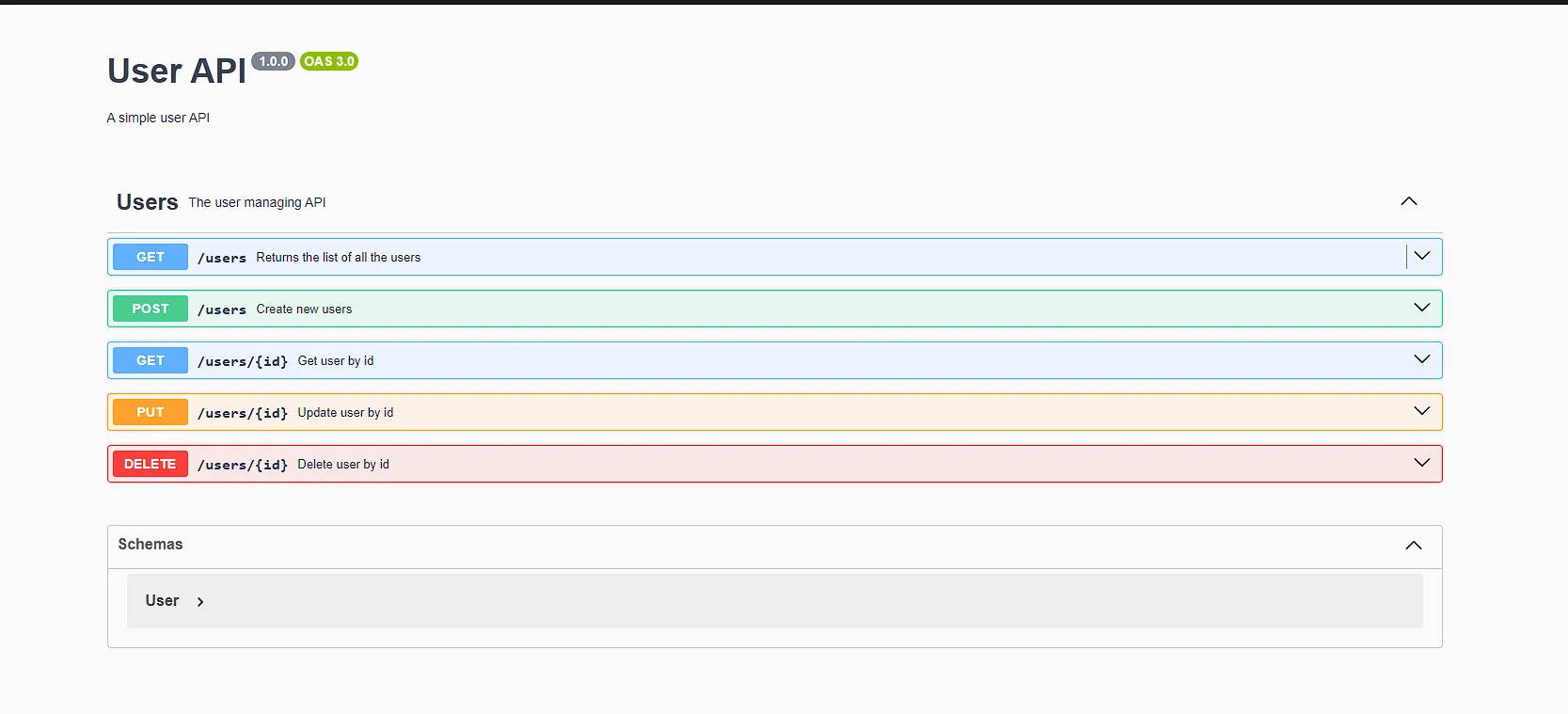
📋 Overview
This is a simple project created to learn how to integrate and use Swagger for API documentation with Express.js. It provides hands-on experience with OpenAPI specifications and automated API documentation generation.
✨ Features
- Swagger UI Integration: Interactive API documentation
- OpenAPI 3.0 Specification: Modern API documentation standard
- Express.js Backend: RESTful API implementation
- Interactive Testing: Try API endpoints directly from documentation
- Auto-generated Docs: Documentation updates with code changes
- YAML Configuration: Clean, readable API specifications
🛠️ Technologies Used
- Node.js: Runtime environment
- Express.js: Web framework
- Swagger UI Express: Swagger documentation middleware
- YAML: API specification format
- JavaScript (ES6+): Programming language
📁 Project Structure
swagger-express-learn/
├── src/
│   ├── index.js           # Express server entry point
│   └── routes/           # API route handlers
├── swagger.yaml          # Swagger/OpenAPI specification
├── package.json          # Dependencies and scripts
├── eslint.config.mjs     # ESLint configuration
├── .eslintrc.json       # ESLint rules
└── README.md
🚀 Getting Started
Prerequisites
- Node.js 20.0.0 or higher (important for compatibility)
- npm or yarn package manager
- Basic understanding of REST APIs
Installation Steps
-
Clone Repository
git clone <repository-url> cd swagger-express-learn -
Install Dependencies
npm install -
Run Development Server
npm run dev -
Access Swagger Documentation
Open your browser and navigate to:
http://localhost:3000/api-docsYou'll see the interactive Swagger UI with all your API endpoints documented!
💻 Usage
Viewing API Documentation
- Start the server:
npm run dev - Open browser:
http://localhost:3000/api-docs - Explore the documented endpoints
- Try out API calls directly from the interface
Testing API Endpoints
Swagger UI allows you to:
- Select an endpoint
- Click "Try it out"
- Enter parameters/body data
- Execute the request
- View the response
Example Endpoints
paths:
  /api/users:
    get:
      summary: Get all users
      responses:
        '200':
          description: Successful response

  /api/users/{id}:
    get:
      summary: Get user by ID
      parameters:
        - in: path
          name: id
          required: true
          schema:
            type: integer
📝 Swagger Configuration
swagger.yaml Structure
openapi: 3.0.0
info:
  title: My API
  version: 1.0.0
  description: API documentation example

servers:
  - url: http://localhost:3000
    description: Development server

paths:
  # Your API endpoints here

components:
  schemas:
    # Your data models here
Adding New Endpoints
-
Define in swagger.yaml:
/api/products: post: summary: Create a product requestBody: required: true content: application/json: schema: type: object properties: name: type: string price: type: number -
Implement in Express:
app.post('/api/products', (req, res) => { // Implementation res.json({ success: true }); }); -
Documentation auto-updates!
🎨 Key Concepts
OpenAPI Specification
- Paths: API endpoints
- Methods: HTTP verbs (GET, POST, PUT, DELETE)
- Parameters: Query, path, header parameters
- Request Bodies: POST/PUT data structures
- Responses: Expected response formats
- Schemas: Data model definitions
Swagger UI Benefits
- Interactive: Test APIs without external tools
- Always Up-to-date: Documentation matches code
- Standardized: Industry-standard format
- Client Generation: Can generate API clients
- Collaboration: Easy for teams to understand APIs
🔧 Available Scripts
# Development with hot reload
npm run dev

# Start production server
npm start

# Run linting
npm run lint

# Fix linting issues
npm run lint:fix
📚 Learning Resources
This project helps you learn:
- OpenAPI/Swagger specification
- API documentation best practices
- Express.js middleware integration
- RESTful API design
- YAML syntax
- Interactive documentation
🐛 Troubleshooting
Swagger UI Not Loading
- Check if server is running
- Verify swagger.yaml syntax
- Check browser console for errors
Node Version Error
- Ensure Node.js 20+ is installed
- Use nvm to switch versions:
nvm use 20
YAML Parsing Error
- Validate YAML syntax
- Check indentation (use spaces, not tabs)
- Use online YAML validators
🚀 Next Steps
After mastering the basics:
- Add authentication documentation
- Document complex schemas
- Add examples to endpoints
- Implement versioning
- Add response code documentation
- Create reusable components
- Document error responses
🎯 Use Cases
- Learning API documentation
- Creating RESTful APIs
- Team collaboration
- API-first development
- Client SDK generation
- Testing and debugging
📖 Documentation Structure
Swagger UI
├── Info Section (Title, Version)
├── Servers (API base URLs)
├── Tags (Endpoint grouping)
├── Paths (API endpoints)
│   ├── GET /endpoint
│   ├── POST /endpoint
│   └── ...
└── Schemas (Data models)
🤝 Contributing
This is a learning project. Feel free to:
- Add more endpoints
- Improve documentation
- Enhance examples
- Share feedback
📄 License
Open source - available for educational purposes.
💡 Tips
- Start Simple: Document basic endpoints first
- Use Examples: Add request/response examples
- Group Endpoints: Use tags for organization
- Describe Errors: Document error responses
- Keep Updated: Sync docs with code changes
- Test Thoroughly: Use "Try it out" feature
Happy API Documenting! 📚✨
Making APIs understandable, one endpoint at a time!